“The login succeeded. Why could the user not open the file?” “We reset the password. Why did the application still accept requests?” These sound like separate support problems. They share one cause: signing in, having permission and keeping a session are different things.
In Topic 03 you inspected local users and permissions. In Topic 04 you read logon records without turning an outcome into a verdict. Here you will connect those ideas to accounts used by websites, cloud services and automated jobs.
You need: a browser, a text editor, the fictional practice file and the Topic 05 workbook. The core exercise needs no Windows administrator rights, cloud tenant or paid security tool. Allow about four hours: roughly 90 minutes to read, an hour for the two exercises, and time to check and explain your answers.
The eight diagrams are original teaching illustrations, not product screenshots. Open any diagram at full size. Nothing in this lesson asks you to reveal a password, export a session cookie, enrol a new method or change access on a work system.
1. Four questions behind one sign-in
| Question | Term | Example | What remains unanswered |
|---|---|---|---|
| Which account are you claiming? | Identification | Entering mira-01 |
Whether the claimant controls its authenticator. |
| Can you prove control of an authenticator bound to it? | Authentication | A password and a one-time code, or a passkey ceremony | Whether this person intended the action; what access is permitted. |
| May this account perform this action on this resource now? | Authorisation | Read a Finance invoice, but not approve payment | Whether a later request has the same permission. |
| How is that authenticated state continued? | Session management | An application accepts its session cookie on the next request | Whether the session is still valid, appropriately protected and authorised for that request. |
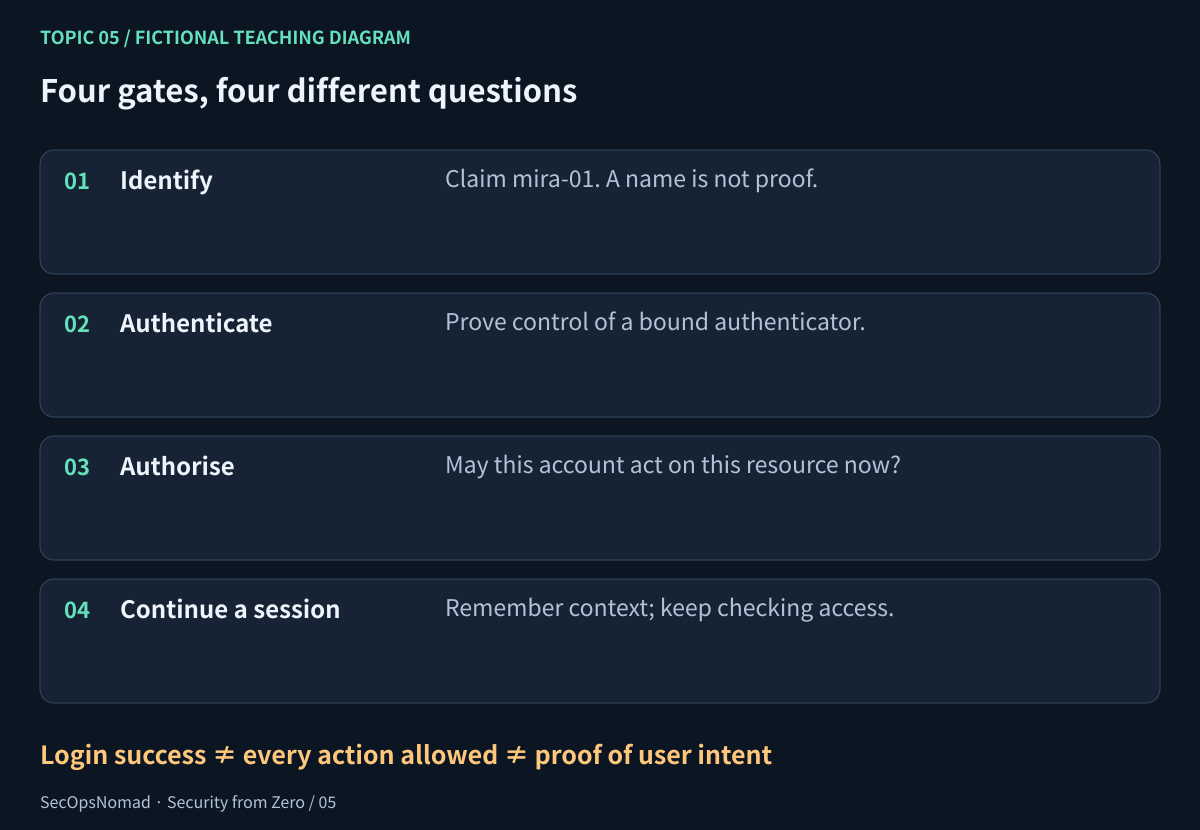
Figure 1. Each gate answers a different question. A remembered session does not remove the need to check access.
An identity represents a person, workload or other entity. An account is a record used by a particular system. An authenticator is something used to prove control, such as a password or cryptographic key. A permission allows an action; a role groups permissions. A group collects accounts and may be used to assign roles. A session links later requests to an authenticated context.
One person may have a normal account and a separate privileged account. The same display name may appear in different directories. An email address can change. In real evidence, retain the tenant or directory and the system's stable account identifier as well as the name; none of those alone tells you who operated the account.
Checkpoint: entering a colleague's username is identification. It is neither proof of their identity nor permission to read their files.
2. Know which kind of account you are looking at
| Account type | Typical purpose | Useful controls | Analyst question |
|---|---|---|---|
| Personal human account | Email, documents and everyday work | Individual ownership, appropriate MFA, minimum access | What would this person's job normally require? |
| Privileged human account | Approved administrative tasks | Separate daily-use account, short-lived elevation, stronger sign-in controls and auditing | Which role, scope and approval made this change possible? |
| Guest or contractor account | Time-limited collaboration | Sponsor, expiry and review of shared resources | Does access still match the contract and the task? |
| Workload or service identity | A scheduled export, application or integration | Named owner, narrow permissions, short-lived credentials or workload federation where supported | Why is an automated job using an interactive sign-in? |
| Emergency-access account | Recovery when normal access fails | Separately designed protection, monitoring and tested procedures | Was its use expected, approved and followed up? |
A service identity is not a person who can tap “Approve” on a phone. Do not fix that by excluding every automation account from every control. Give the workload an appropriate authentication method and only the actions it needs. Managed identities and workload federation can reduce stored secrets where supported; they do not remove permission or ownership risks.
Shared human accounts make attribution harder: the record shows a shared credential, not which person used it. A service owner should be able to explain its purpose, callers, permissions, credential lifetime and what will break if it is disabled. Do not disable a production integration just to practise this lesson.
3. Passwords: protect a reusable secret
A password is something you know. Its main weakness is reuse: another site's breach or a convincing phishing page may give an attacker the same secret you use here. Encrypting a connection with HTTPS protects transport; it does not make the person running the destination trustworthy.
For your own accounts, use a reputable password manager to generate and store a long, unique password for each service. Protect the manager with a strong master secret and an appropriate additional factor. Understand its recovery process. If you create a passphrase yourself, choose unpredictable words rather than a quotation, a personal fact or a small variation of an old password.
For a managed account, follow the organisation's policy and report suspected compromise through its process. A scheduled password change is not a substitute for uniqueness, phishing-resistant authentication, sound recovery and investigation. If a secret is exposed, changing it is one necessary action; later sections explain why it may not finish containment.
When reviewing a service's design, look for rate limiting, checks against commonly used or compromised passwords, protected password storage and a secure reset process. Do not test these by guessing a real user's password. Password hashing and encryption are different; the application should not need to recover the user's original plaintext password to verify it.
Do not use a password printed in a tutorial as your password. Every credential-like label in the download is only an account or session reference, not a usable secret.
4. MFA: count factors, not screens
Multi-factor authentication (MFA) combines distinct kinds of evidence. Two steps are not automatically two factors.
| Factor | Examples | Important limit |
|---|---|---|
| Something you know | Password; a local activation PIN in an appropriate authenticator design | A password plus a security answer is still knowledge twice. |
| Something you have | A security key; an authenticator holding an OTP or cryptographic secret | Merely owning a phone is not a completed authentication check. |
| Something you are | A fingerprint or face used to activate an authenticator | In these designs the biometric works with the authenticator; it is not a remote password to send to the website. |
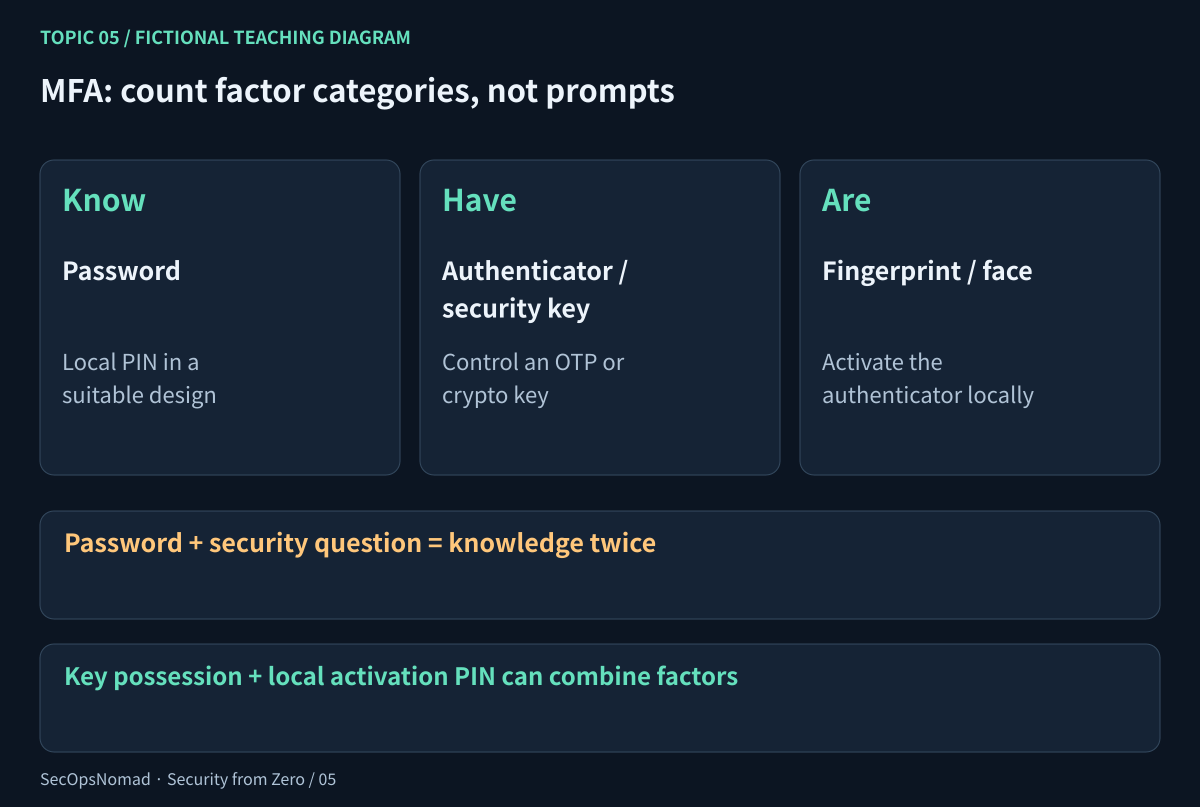
Figure 2. Count independent factor categories. One device can implement a multi-factor authenticator.
An authenticator app's time-based one-time password (TOTP) changes regularly. That is better than a password alone, but an attacker can ask you to enter a current code into a phishing flow and relay it while it is valid. SMS codes have additional phone-number and delivery risks. Repeated push prompts can pressure a person into approval; number matching improves context but is not the same as cryptographic phishing resistance.
If you receive an unexpected prompt, deny it and report it through a known channel. Open the service independently to inspect activity; do not follow a recovery link supplied by the suspicious message. Do not approve a request because someone calling “from IT” tells you to. An unexpected prompt needs investigation, but its arrival alone does not prove that a password was accepted: authentication flows and logs differ.
An event saying MFA satisfied may mean fresh authentication, an existing claim or another policy-recognised condition. Read method details, timestamps and the provider's definitions. Do not turn a summary field into “the user knowingly approved this request”.
5. Passkeys: what the key actually proves
A passkey uses public-key authentication. In a simplified registration flow, the authenticator creates a key pair, and the service associates the public key and a credential identifier with the account. The private key is managed by the authenticator; it may be device-bound or protected and synchronised through a provider, depending on the design.
At sign-in, the service sends a fresh challenge. The authenticator performs the required local user checks and signs the appropriate authentication data. The service verifies that proof with the registered public key and checks the challenge and relying-party context. The browser and authenticator enforce the relevant site/origin binding; this is not just an encrypted password exchange.
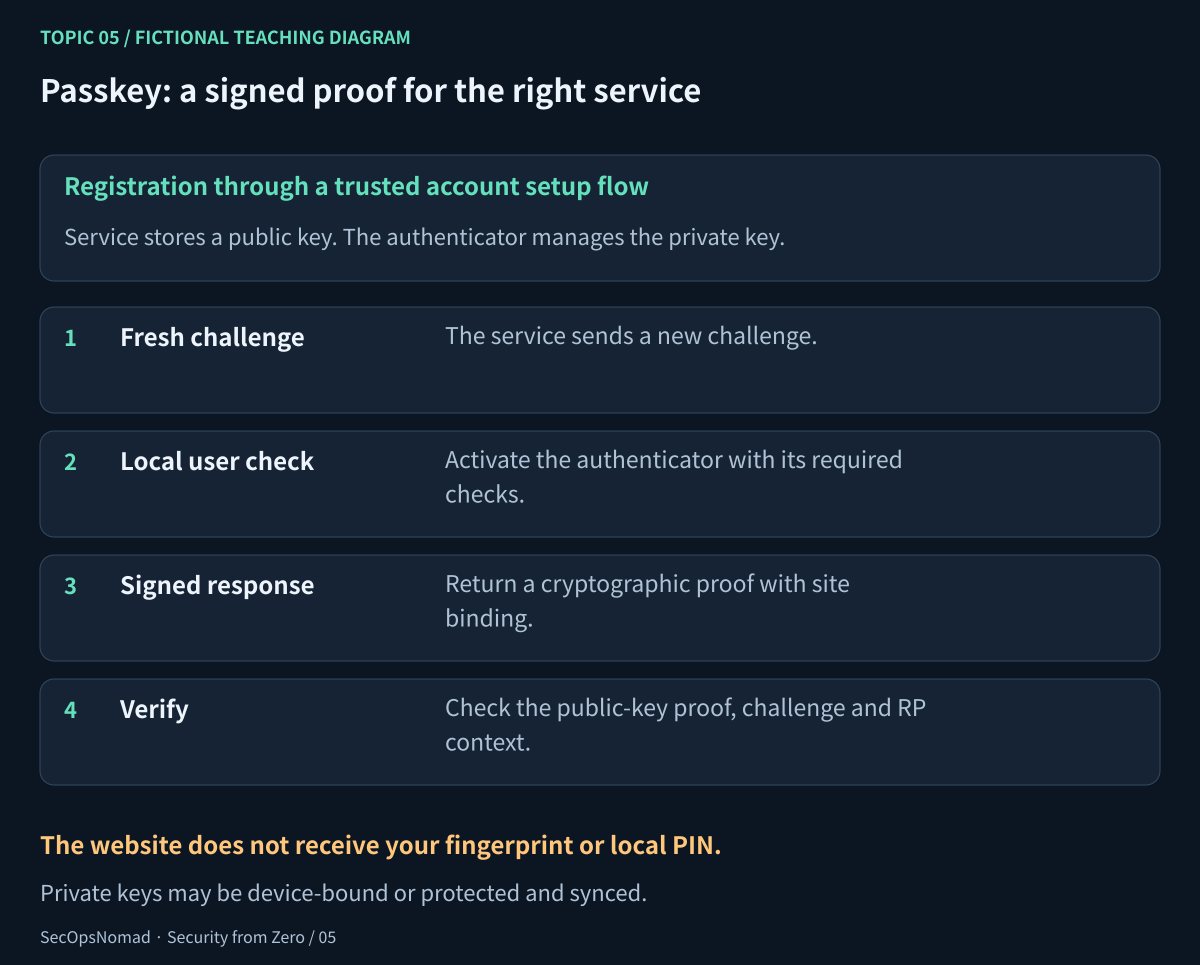
Figure 3. The service checks a cryptographic proof. It does not receive your fingerprint or local activation PIN as a reusable login secret.
This site binding is why correctly implemented WebAuthn/FIDO authentication resists ordinary credential-relay phishing. It does not make every action safe: an unlocked or compromised device, stolen application sessions, weak account recovery or excessive privileges still matter. A sign-in can also fall back to a weaker method if the service allows one.
Do not assume that every passkey stays on one device, that every deployment uses the same user-verification settings, or that every biometric sign-in has the same assurance. Check the service and authenticator configuration. Before changing a personal account, verify an independent recovery route and understand what happens if the phone, security key or sync account is lost. For work, use the supported enrolment and recovery process.
Checkpoint: explain why a passkey can improve sign-in security without granting permission to approve an invoice.
6. Sessions and SSO: why you are not asked every time
A session lets a service recognise later requests without making you repeat a full sign-in. It commonly uses a cookie or token. These may act as bearer secrets: possession can be enough to use them within their validity and other enforced checks. A token is not always a JWT; decoding a readable token is not the same as verifying it.
Single sign-on (SSO) lets an identity provider (IdP) authenticate a user for an application, often called the relying party. The application validates the appropriate assertion or protocol response and may create its own session. That application still needs an authorisation policy. Signing in through a company portal does not mean every application grants the same rights.
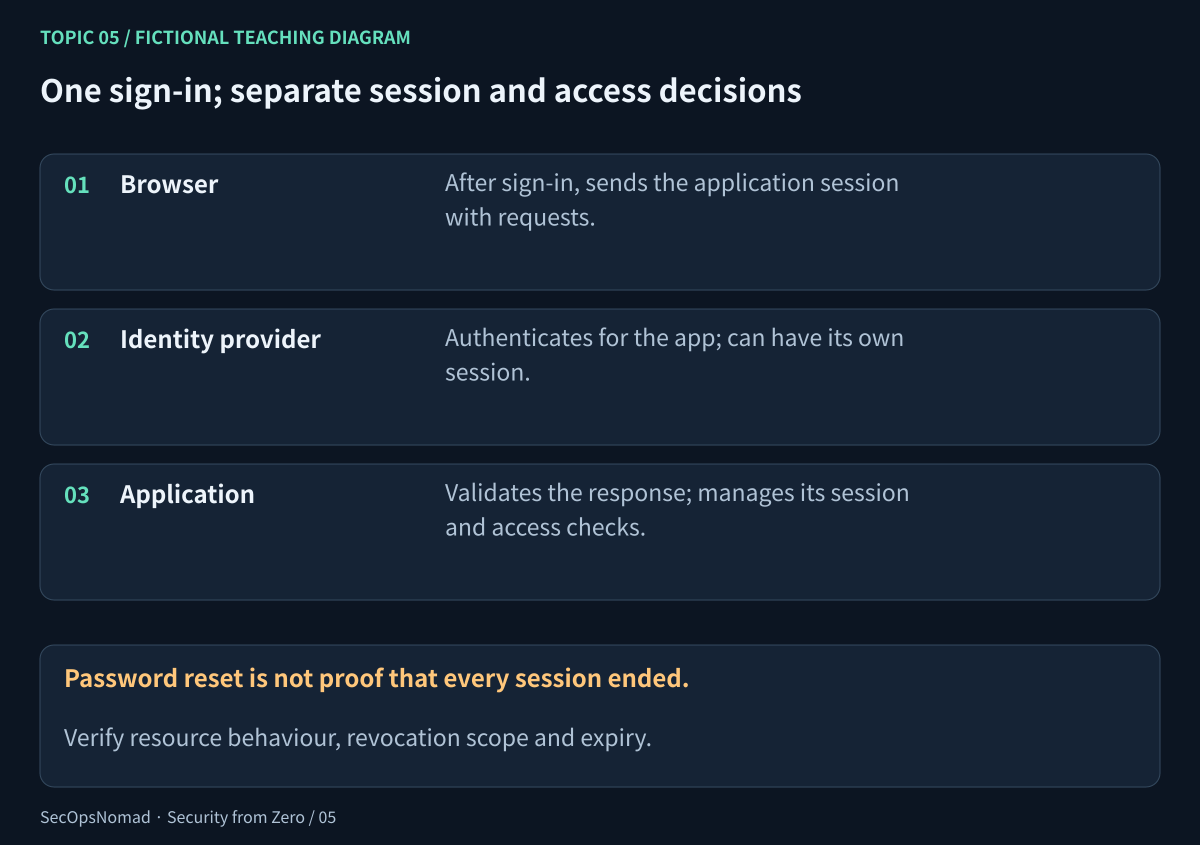
Figure 4. Authentication establishes a context. Applications must continue to enforce its validity and access rules.
| Action | What you should not assume |
|---|---|
| Close a tab | That the server-side session has ended. |
| Sign out of one application | That all devices, applications and IdP sessions are signed out. |
| Reset the password | That every session, access token and integration credential is immediately invalid. |
| Request session revocation | That every application already enforced it; different token and session types behave differently. |
| Remove a role or disable an account | That every cached permission or already-issued token has instantly changed. |
During an authorised response, preserve relevant evidence, use the provider's supported containment actions, identify the affected applications and verify the result. A successful revocation API call shows the request was accepted, not that every resource has rejected every previously issued credential. Check subsequent application activity, policy propagation, token lifetime and any service-specific session controls.
Never put real cookies, bearer tokens, recovery codes or authenticator QR codes in a ticket, public repository or portfolio. Use approved correlation identifiers rather than secret values. The sample's s-mira-A is a harmless reference, not a cookie.
7. Authorisation: role, action, resource and time
Least privilege means access sufficient for the required task, with no unnecessary capabilities, scope or duration. “Everyone has read access” is not least privilege if only Finance needs the invoices. Removing an approval role after a task is as important as requiring a strong sign-in before it.
Role-based access control (RBAC) assigns permissions through roles. Real systems can also evaluate attributes such as resource ownership, device state, location, assurance and time. A group name is not a permission by itself: follow the actual assignment to its role, action and scope. Inspect direct assignments and temporary elevation as well as group membership.
In the practice file, permissions are deliberately simple: grants add together, no explicit denies or nested groups, exact action and scope required. The account must be enabled and use its permitted sign-in channel. A self grant works only when the requested profile belongs to the account. A temporary grant is active from its start time up to but not including its expiry. Real platforms have their own precedence and evaluation rules; this is not a universal ACL algorithm.
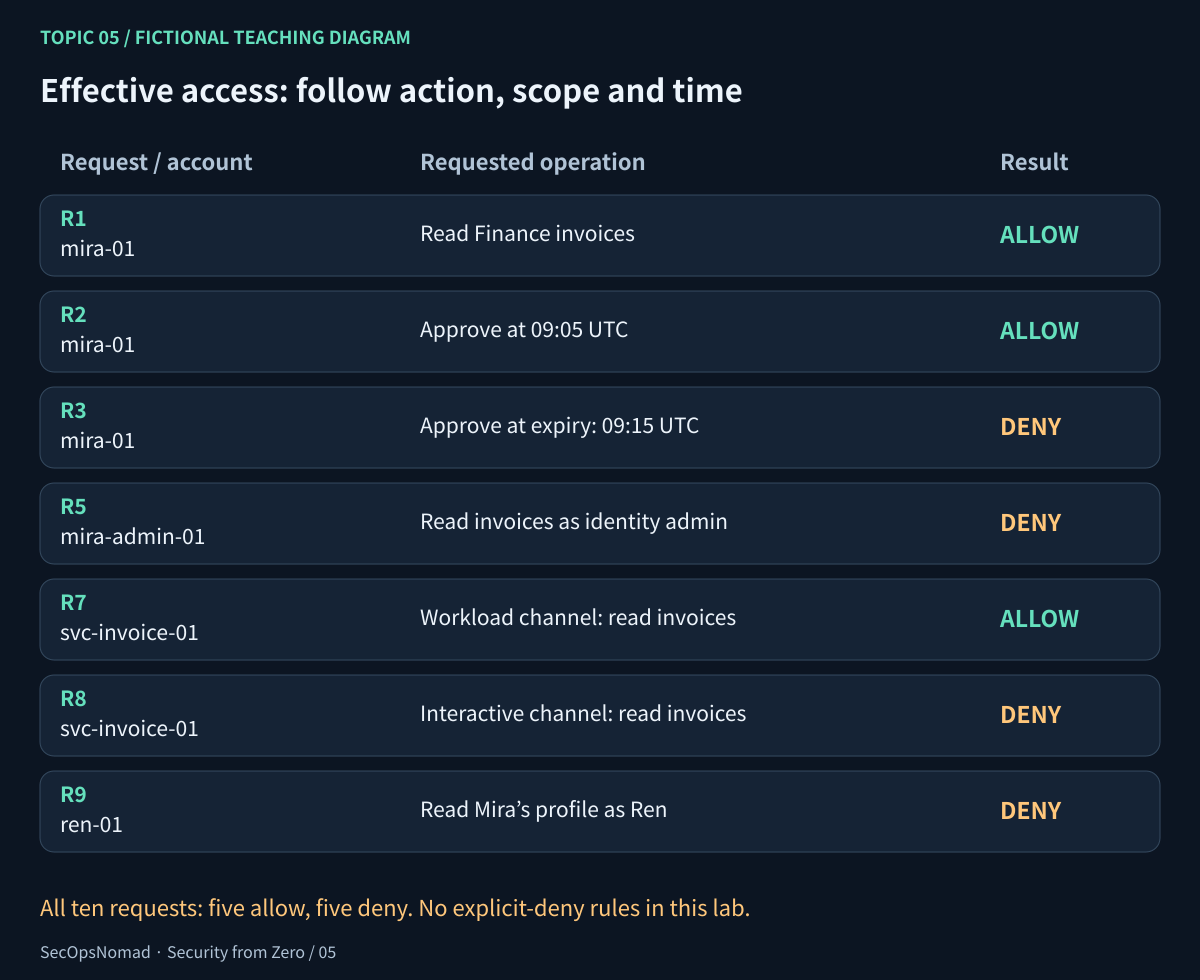
Figure 5. Trace a grant to the requested action. An account called “admin” does not automatically receive every data permission.
The exercise separates the ordinary account mira-01 from mira-admin-01. The latter can manage access in the fictional directory, but its current grants do not include reading invoices. The ability to change future assignments is itself powerful and must be governed and audited; the model does not simulate an administrator granting themselves new rights.
8. Lab A: decide ten access requests
Open the practice JSON. Start with policy, accounts and requests. Ignore events for now; they belong to a separate scenario. In your workbook:
- Find the account by
account_id; checkenabledandchannel. - Expand that account's groups through
policy.groupsinto roles. - Add any temporary role active at the request's UTC timestamp.
- Find a grant with the exact
actionandresource_scope. - For a
selfscope, compareresource_ownerwith the account ID. - Record allow or deny and the decisive rule. A successful authentication would not change a denied permission.
Try all ten before reading the answer key:
| Request | Account and action | Expected decision | Decisive evidence in this model |
|---|---|---|---|
| R1 | mira-01: read Finance invoices at 09:05 |
Allow | finance_readers grants invoice_reader. |
| R2 | mira-01: approve Finance invoices at 09:05 |
Allow | Temporary invoice_approver role is active. |
| R3 | mira-01: approve Finance invoices at 09:15 |
Deny | The temporary grant expires exactly at 09:15:00Z. |
| R4 | ren-01: read Finance invoices |
Deny | No role grants that action and scope. |
| R5 | mira-admin-01: read Finance invoices |
Deny | Its directory-administration role does not grant invoice reading. |
| R6 | mira-admin-01: manage directory access |
Allow | identity_admin grants access.manage on directory. |
| R7 | svc-invoice-01: read invoices as a workload |
Allow | Both workload channel and invoice-read grant match. |
| R8 | svc-invoice-01: read invoices interactively |
Deny | The account is restricted to the workload channel in this exercise. |
| R9 | ren-01: read Mira's profile |
Deny | A self-profile grant does not match another account's resource. |
| R10 | ren-01: read Ren's profile |
Allow | Account ID and resource owner match the self grant. |
Check your work: five allow decisions, five deny decisions. R3 tests a boundary, not whether your clock “looks close enough”. R5 tests effective permissions, not the word “admin”. R9 tests object ownership, not whether a user is signed in.
Do not try these requests against a real invoice or profile endpoint. You are evaluating a static policy on paper, not conducting a penetration test.
9. Account lifecycle and recovery are part of access control
| Stage | Review | Evidence to retain |
|---|---|---|
| Join | Verified account request, owner, baseline role, supported authentication and recovery enrolment | Who approved which scope, when it begins and when temporary access expires. |
| Move | New duties and removal of old access, including direct and supplier grants | Effective access before and after; approvals and expiration checks. |
| Leave | Account access, app sessions, group/role assignments, guest access and workload ownership | Disabled sign-in plus service-specific checks that access actually stopped. |
| Recover | Lost authenticator or suspected account compromise | Verification through an approved channel, methods replaced, recovery information reviewed and sessions checked. |
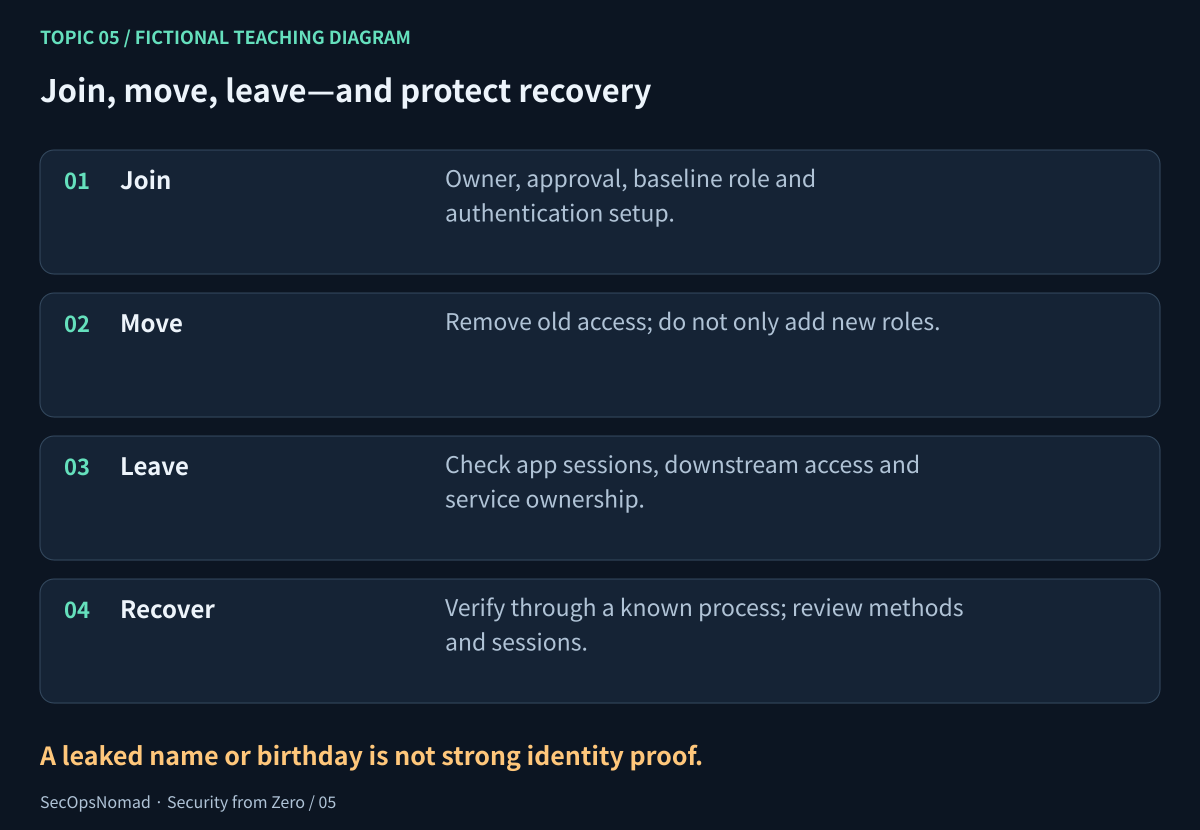
Figure 6. Strong sign-in protection can be undermined by weak recovery or accumulated old permissions.
A name, birthday or phone number found in leaked data is not strong proof of identity. Help-desk recovery should follow the organisation's verified process rather than accept a persuasive caller or a new contact number supplied during the call. Treat recovery codes as secrets. Store them through an appropriate protected method, separate from the only device they recover.
Removing a person's account does not remove every secret they knew or every application permission they approved. Review delegated app access, API keys and automation ownership where relevant. Change or revoke credentials through the approved process, assess dependencies, and verify the outcome rather than blindly rotating everything a business service uses.
10. Lab B: investigate an account and a surviving session
Now read case_note and events. The file contains ten fictional events on 27 October 2026, UTC, from three simplified sources. These names are teaching fields, not a CrowdStrike, Windows or Entra schema. The account labels overlap Lab A for continuity, but Lab B is a separate scenario, not a complete replay of that policy.
Mira reports an unexpected MFA prompt. That is a report to preserve and check, not a conclusion about every event. Read the evidence:
| Reference | UTC | Source and recorded observation | What to avoid assuming |
|---|---|---|---|
| E01 | 09:00:00 | Sign-in success, password+totp, session reference s-mira-A |
That the rightful user intended the sign-in. |
| E02 | 09:04:00 | Application invoice read succeeded | That every later action was allowed or expected. |
| E03 | 09:10:00 | A recovery method was added successfully | That the change was approved by the user. |
| E04 | 09:11:00 | Another sign-in was denied; reason mfa_denied |
That existing sessions were ended. |
| E05 | 09:12:00 | An export started successfully with s-mira-A |
That data was fully downloaded or that new MFA occurred. |
| E06 | 09:14:00 | Password reset recorded success | That every application session immediately stopped. |
| E07 | 09:15:00 | The application accepted another read with s-mira-A |
That a password reset revoked this session. |
| E08 | 09:16:00 | A session-revocation request recorded success | That enforcement had completed at every resource. |
| E09 | 09:16:30 | Another application read succeeded | Why it succeeded; the file omits token and enforcement internals. |
| E10 | 09:20:00 | The application denied a read: session_not_accepted |
That every device, session and application was now contained. |
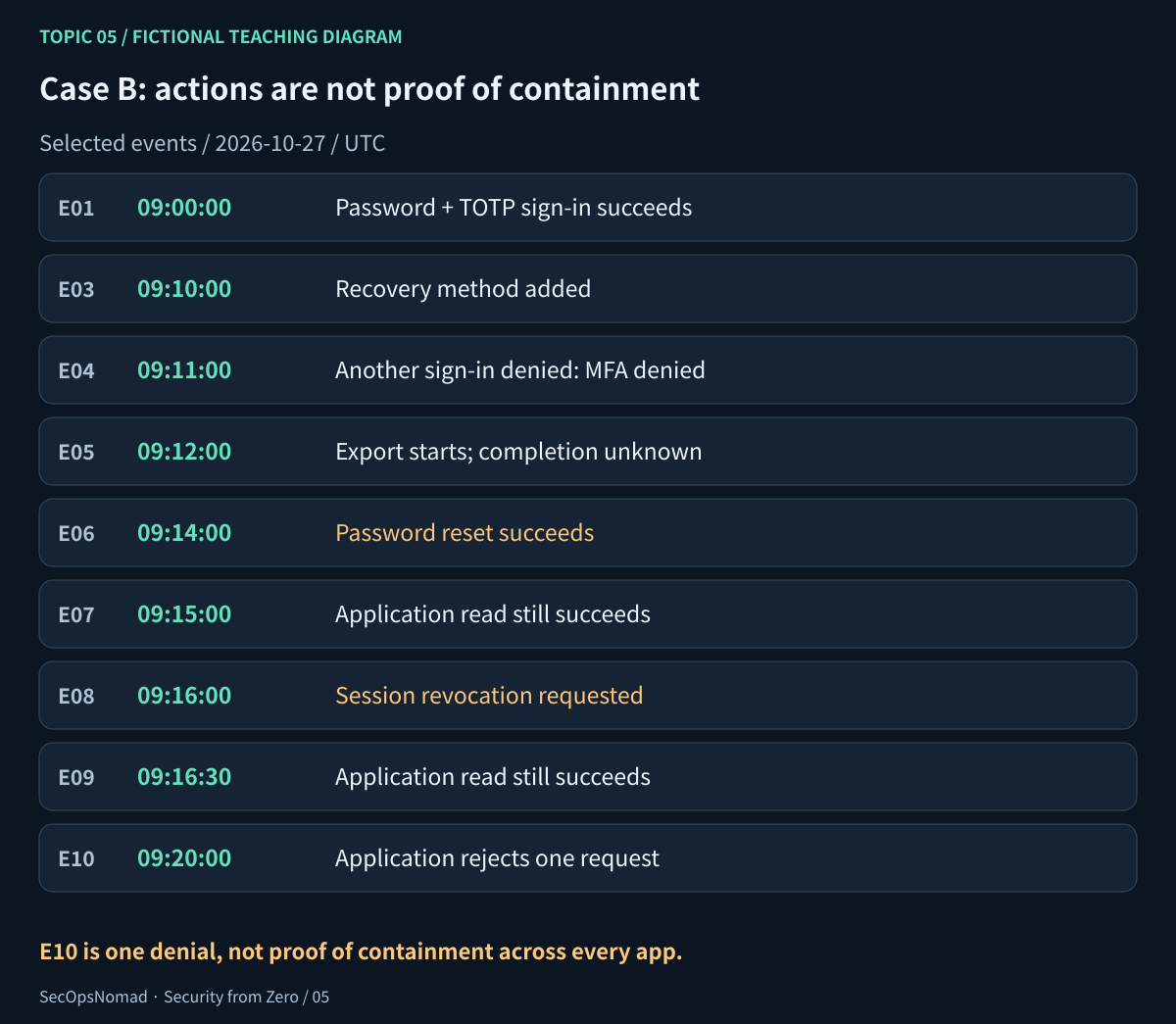
Figure 7. A reset and a revocation request are actions. Later resource activity is evidence about their effect.
The file uses 192.0.2.24 and 198.51.100.17, reserved documentation addresses. They are not indicators to block or enrich. Even a real change of IP can reflect VPN, mobile networks or a proxy. The same session reference across sources is supplied for teaching; real systems may need different correlation identifiers. Do not claim that an IP, account name or time match alone proves one person or one session.
Write answers before checking the workbook:
- Which record shows the successful authentication, and what method is actually recorded?
- Which records show accepted application activity after the password reset? Which is after the revocation request too?
- Does the denied sign-in end the existing session in this sample?
- Does
export.startestablish completion, data volume or the fields exported? - What information would let you decide whether the recovery change and export were expected?
- What evidence would show containment across the relevant services, rather than just one rejected request?
Answer check: E01 records password+totp. E07 and E09 are successful reads after E06; E09 also follows E08. E04 does not stop E05. E05 records a start, not completion or volume. The five application-audit records contain four successes and one denial. Both the unexpected prompt and recovery change deserve escalation through the team's process, but the data does not establish who performed them or prove compromise.
11. Build a sign-in triage note
“Successful login from another country” is not yet a finding you can defend. Ask for context in a useful order:
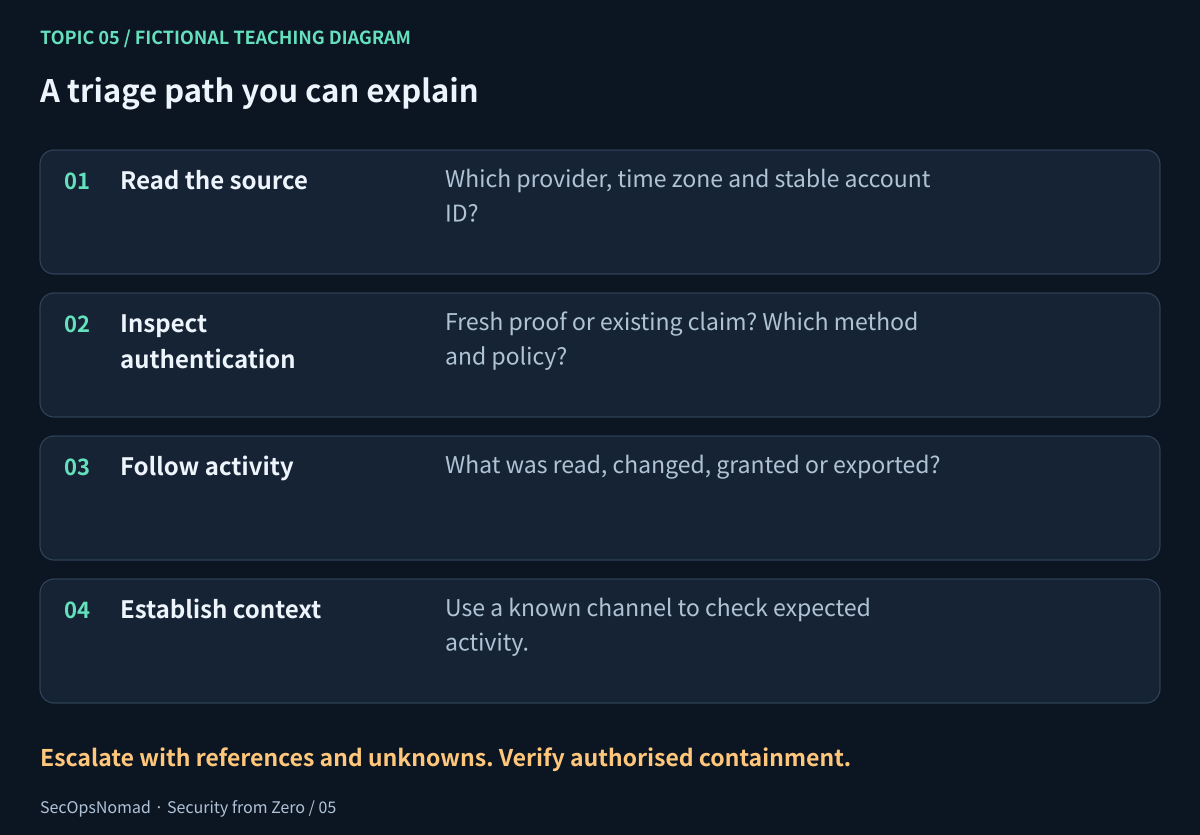
Figure 8. Follow the evidence from sign-in to activity. Keep investigation and authorised containment distinct.
| Check | Question | Evidence that helps |
|---|---|---|
| Source and identity | Which tenant, stable account ID, time zone and event type? | Original record, source health and retention. |
| Authentication and policy | Fresh proof or an existing claim? Which method and policy result? | Authentication-step detail, method enrolment history and policy evaluation. |
| Device and network | Expected device and connection, or merely a familiar address? | Device identity/health and approved VPN or asset records for that time. |
| Application actions | What was read, changed, granted or exported afterward? | Object IDs, app audit events, session correlation, export completion and volume. |
| Account changes | Were recovery methods, app consents or roles changed? | Identity audit logs and approvals; direct and temporary grants. |
| Containment effect | Did access stop where it mattered? | Supported response-action records, expiry/revocation behaviour and subsequent resource logs. |
A defensible note for the practice case says: “Mira reported an unexpected MFA prompt. E03 records a recovery-method addition; E05 an export start. The application accepted session-labelled requests after the password reset and revocation request (E07, E09). E10 later records one denial. Intent, export completion and wider session state are unresolved.”
Then request specific follow-up: preserve the original records; verify expected activity through an established channel; obtain authentication-step, recovery-change, export and device context; and have the authorised responder apply and verify the relevant account/session controls. Do not write “account safe” solely because the password was changed, or “data stolen” solely because an export started.
12. Optional local check: your current account is not every cloud role
On your own Windows PC, Command Prompt can show the current account's SID and the groups in its current security token:
whoami /user
whoami /groups
On your own Linux system:
id
Read the username and identifiers; distinguish a group from a role assignment in another service. A Windows token can contain groups with attributes such as deny-only, so listing an administrators group is not proof that this process is elevated. These commands do not enumerate every Microsoft 365, SaaS or cloud permission. Existing tokens may not reflect a recent membership change until refreshed according to that system's behaviour.
Keep real identifiers private. Record only that you completed the local check in a portfolio, or use the fictional accounts instead. The core lesson does not require changing a group, switching to an administrator account or viewing another person's account.
13. Check your understanding and save a portfolio artefact
| Question | A useful answer includes |
|---|---|
| Is a password plus a security question MFA? | Both are knowledge; count different factors, not prompts. |
| Does a local PIN make a passkey “just another password”? | It can activate a cryptographic authenticator locally; the service verifies a cryptographic proof. |
| Why can a signed-in user receive access denied? | Authentication and authorisation answer different questions; check action, resource and scope. |
| Why is an “admin” account denied R5? | This model grants directory administration, not invoice reading. |
| Why is R3 denied exactly at 09:15? | Temporary access is end-exclusive under the stated exercise policy. |
| Does a password reset finish containment? | Not necessarily; identify and verify the affected sessions, credentials and applications. |
| Does an MFA success or an IP change settle an alert? | Neither alone establishes the person's intent, activity or compromise. |
Your completed workbook should contain the ten access decisions with reasons, a referenced UTC timeline, an account/session triage note and a short access-review checklist. A truthful project description is: “Evaluated a fictional role-and-scope policy, analysed identity and application audit records, and explained authentication, session and containment limits.” Do not claim you administered a real identity tenant or investigated a real intrusion.
Topic 06, triage a suspicious email, is next in the roadmap. The connection is direct: a message may try to steal a credential, obtain an approval or divert recovery. You now know which part of the access chain it is trying to influence.
Sources, scope and execution note
- NIST SP 800-63B-4: authentication and authenticator management, especially authenticator factors, phishing resistance, authenticator events, sessions and syncable authenticators. Reviewed through NIST's own repository copy.
- NIST SP 800-63C-4: federation and assertions, for the IdP, relying party and application-session distinction; official repository copy.
- OWASP's Authorisation Cheat Sheet, Session Management Cheat Sheet and Forgot Password Cheat Sheet. The source Markdown in the project's official repository was reviewed for least privilege, per-request checks, session invalidation and recovery handling.
- Microsoft: whoami and GNU Coreutils: id describe the optional local commands. The commands were not executed on a learner's Windows or Linux machine as part of this article.
Reference text was reviewed on 28 October 2026. Network restrictions prevented retrieval from the NIST web host and CISA pages; the lesson relies on the retrieved NIST and OWASP official repository texts, not on unread CISA material. These standards and cheat sheets explain concepts; they do not establish a particular employer's policy or every vendor's revocation semantics.
The JSON, access decisions, event references and visual labels are checked in the publishing workspace. No live identity tenant, real sign-in, authenticator enrolment, reset or revocation was exercised. The workbook uses only fictional information. The examples are learning tools, not detection signatures or production access-control code.
28 October 2026: prepared in English and Japanese. Return to the roadmap.