
AI-assisted intrusions compress the time between finding a useful detail and trying the next action. The underlying work remains recognisable: read an API specification, try an identity flow, change a record, run a shell, acquire another credential. A harness keeps that work moving, shares results between workers and revises the next task when a route fails.
Microsoft's Storm-0940 reporting describes attempts against more than 2,250 tenants following the ConnectWise compromise, with privileged cloud access within three hours in some ARTEX-driven attacks. Its separate password-spray campaign against 327 accounts at eight organisations produced no successful sign-ins. CrowdStrike's Vapor Panda reporting describes more than 200 targets, with post-exploitation confirmed at nine. These are different measures and cases; an attempted target is not a confirmed breach. We checked those accounts through THN's Microsoft report and CrowdStrike summary.
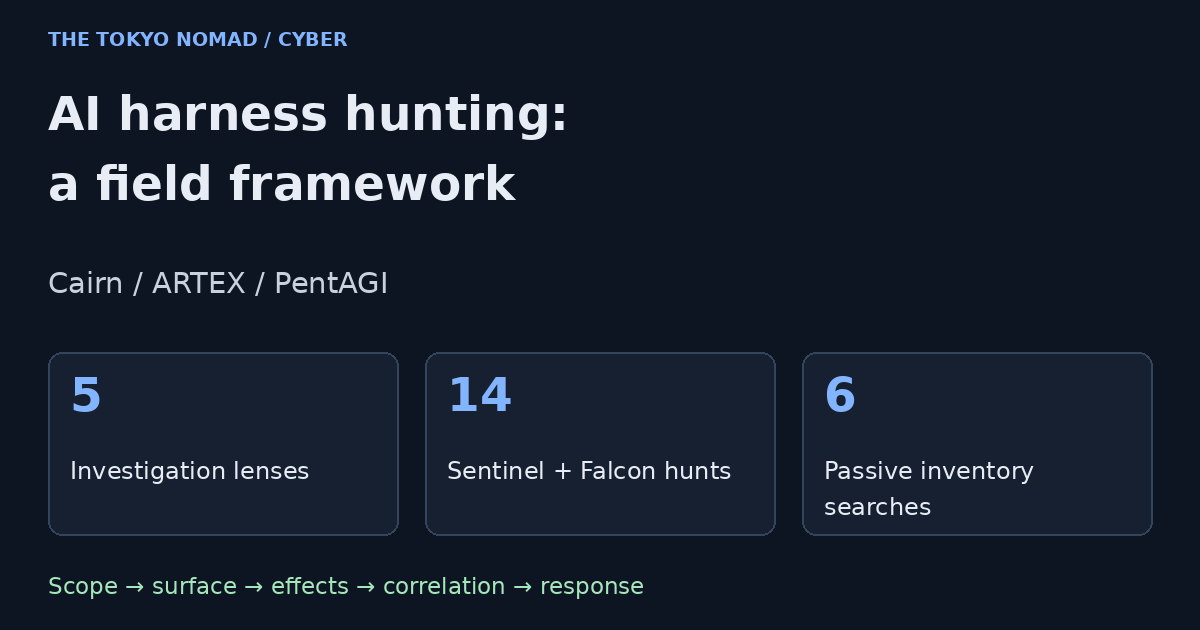
The response is a repeatable investigation framework, with several views of the same activity. This expanded guide uses five lenses, fourteen downloadable hunts and six passive searches. Six representative native queries appear inline; the complete hunt pack contains all fourteen, operating notes, a coverage matrix and review records.
1. Understand the harness and its trust boundaries
A model proposes or selects work; the surrounding software supplies tools, memory, scheduling, credentials and an interface for the operator. Parallel workers can continue after office hours and test different routes. Humans can still steer the operation. The presence of autonomy does not mean there is never a human in the loop.
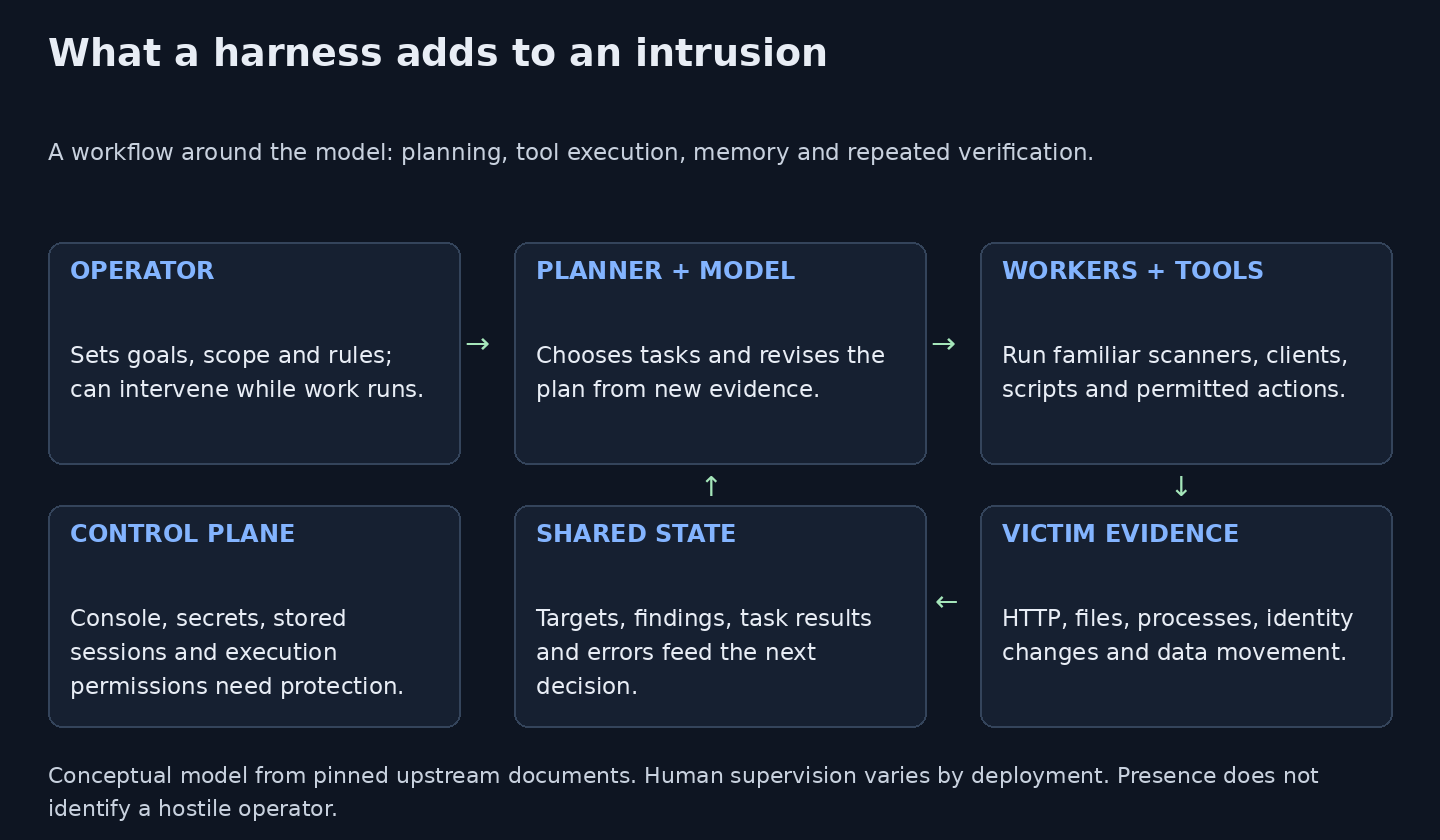
Figure 1. Original conceptual model from the pinned upstream documents. The control plane needs its own security boundary.
The console is also a control plane. It can expose project evidence, execution permissions, model access and stored sessions. A compromised console may give another operator access to the legitimate tester's resources. Containers need separate scrutiny: mounting the host's Docker socket or giving a local worker the user's permissions changes the boundary considerably.
| Harness | Control-plane facts and the hunting implication |
|---|---|
| Cairn | The pinned upstream Compose publishes port 8000 and mounts the Docker socket for its dispatcher. The checked FastAPI app and routers have no built-in authentication dependency or middleware. An external authenticating proxy may still protect a deployment; verify all routes. |
| ARTEX | Unit 42 observed an nginx response with HTTP Basic realm ARTEX. The supplied RST reference describes port 8787, translated builds and renamed forks. Authentication, port and branding vary across versions; a title is a discovery lead. |
| PentAGI | The pinned Compose defaults to 127.0.0.1:8443. Its README describes a login, an initial local administrator and changing the default password. Publicly reachable instances reflect deployment choices; the shipped bind is not an internet exposure claim. |
We read the pinned Cairn and PentAGI sources and hashed their public assets; we did not run either framework. Cairn's local execution mode explicitly warns that workers run with the user's permissions and no sandbox. Use the version actually deployed in your environment when translating these observations into controls.
The Cobalt Strike comparison is useful in one respect: legitimate testers and intruders can share a toolchain, while forks preserve capabilities after names change. It supplies no verdict about a particular owner. A red-team exercise, a CTF lab and an intrusion can all contain similar clients, banners or scripts.
2. Apply five investigation lenses
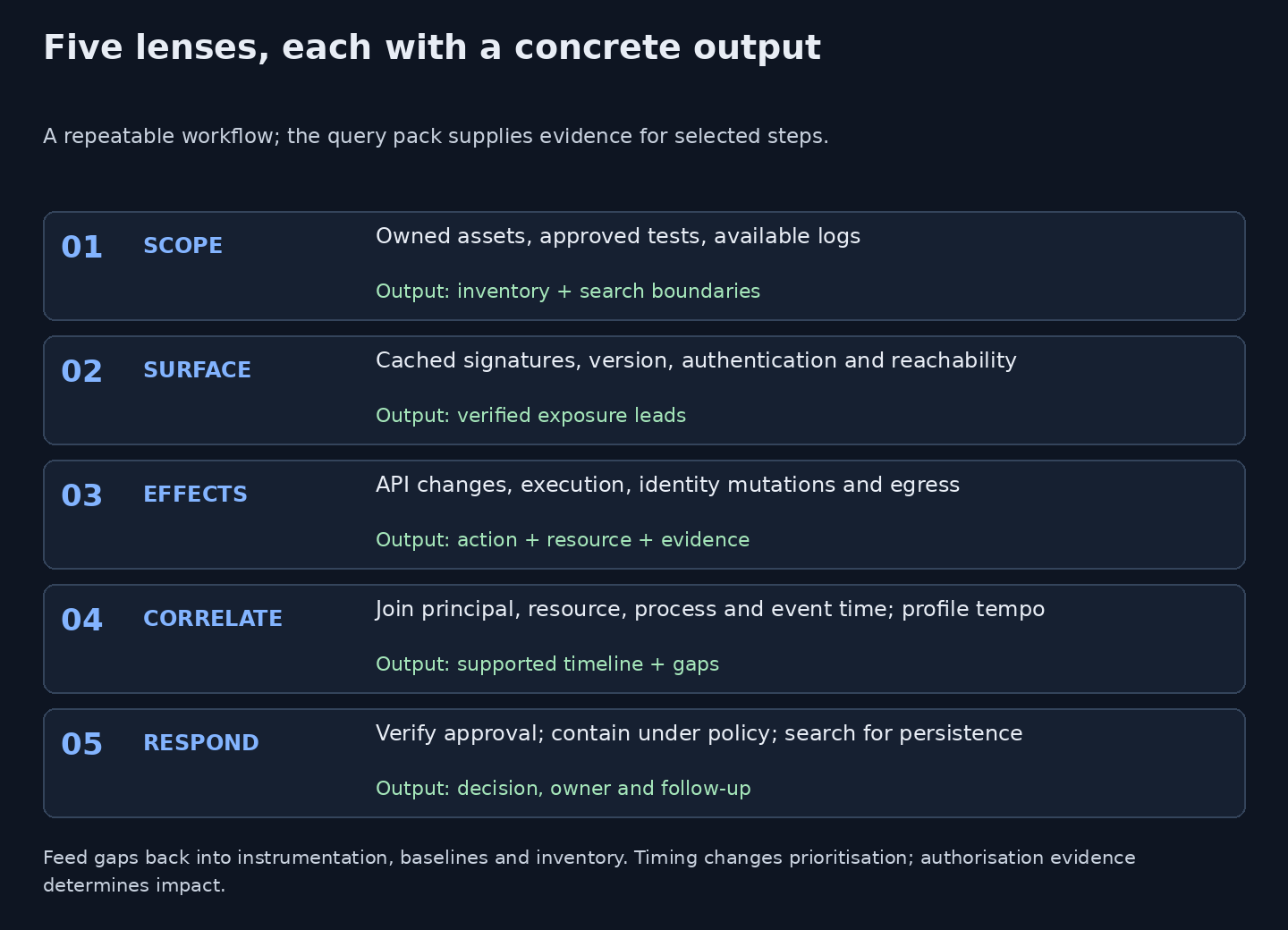
Figure 2. Original five-lens framework. Each stage has an input and an accountable output.
Scope. Start with authoritative asset ownership, a time range, approved exercise windows and a telemetry inventory. Record which proxy supplies the real client address, which server owns the resource, and which team can confirm permission. A cloud provider's ASN or country is not your asset boundary. For a single leased cloud address, use its authorised IP or /32, rather than searching an entire provider range as though you owned it.
Surface. Search cached internet-index observations for family clues, then check the stored evidence and the deployed version. Keep service records as IP, port, protocol, observation time and source. Count unique IPs separately. A proxy's Basic-auth challenge may hide a title; a fork may change the title while retaining an asset or template. A copied favicon can also belong to an unrelated page.
Effects. Ask what actually happened on the victim side: API reads and writes, child processes, files, authentication, directory changes or outbound bytes. Unit 42's account highlights accepted writes and read-backs; JPCERT/CC's alert adds configuration/backup theft and exposed WSUS targeting in case E. Its API case B and JSP web-shell case D are separate cases, not AI attribution.
Correlate. Prefer a validated principal, exact resource identifier and process lineage over a shared source IP. Use event time and allow for ingestion delay. Retain the application's authorisation decision and resulting state. An HTTP 2xx can mean a generic page, an asynchronous acceptance or a legitimate save; a subsequent 403 does not undo a preceding change. Never log raw bearer tokens to create a correlation key.
Respond. Set confidence, a responsible owner and the next evidence request. A timing anomaly can justify a hunt; a confirmed unauthorised credential change may justify rapid containment under a pre-approved playbook. Scope other sessions, credentials and persistence after the first route is contained. Feed missing fields, sensor gaps and bad joins back into instrumentation.
3. Hunt exposure without turning it into attribution
The supplied RST Labs reference, dated 2 November, reports 56 Cairn, 834 ARTEX and 459 PentAGI hosts, with 1,341 unique IPs across families. We have not reproduced its census, country distribution, reputation checks or provider coverage. The three family counts sum to 1,349 memberships; their union need not equal that sum when an IP hosts multiple families. That distinction matters when combining datasets.
The reference also describes targeted Netlas scans alongside cached index data. This revision performs neither those scans nor a new global search. The following are passive Shodan starters for assets you own or are authorised to assess. Run each line separately, union the results, verify family-specific evidence in the stored response, then deduplicate. Generic Next.js, Vite or uvicorn strings narrow a search; they do not identify a harness on their own.
# Passive Shodan inventory starters. Replace with an OWNED/authorised IP or CIDR (use /32 for a single cloud IP).
# Execute each line separately, union the results offline, verify stored banners and deduplicate IP+port before IP totals.
# These are not malicious-host lists; no search or third-party console access was performed for this article.
net:REPLACE_WITH_OWNED_CIDR product:"Cairn"
net:REPLACE_WITH_OWNED_CIDR http.title:"Cairn" http.server:"uvicorn"
net:REPLACE_WITH_OWNED_CIDR http.title:"ARTEX — 自主渗透测试控制台"
net:REPLACE_WITH_OWNED_CIDR "WWW-Authenticate" "ARTEX"
net:REPLACE_WITH_OWNED_CIDR ssl.cert.issuer.cn:"PentAGI CA"
net:REPLACE_WITH_OWNED_CIDR http.favicon.hash:-1596753120
Download the six searches. Search syntax and coverage differ between providers. For Netlas or Censys, use their documented certificate/body/hash fields rather than pasting a Shodan expression into another engine. Do not access someone else's console, try a default password or launch a scan merely because it appears in an index.
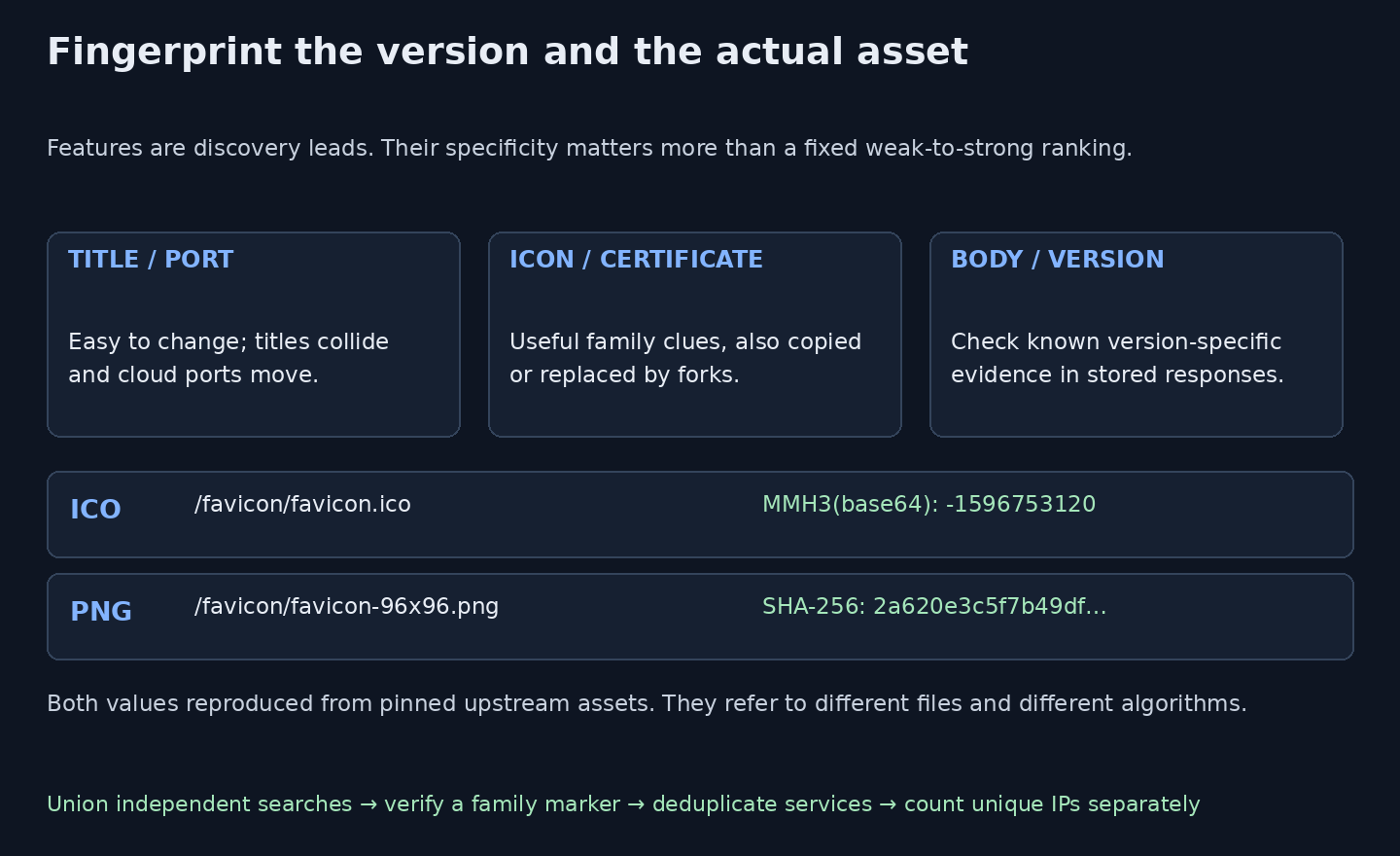
Figure 3. Original fingerprint guide. The two reproduced values refer to different files and algorithms, not competing hashes of identical bytes.
We reproduced the two PentAGI favicon values from different pinned upstream files. The ICO at /favicon/favicon.ico yields Shodan-style MurmurHash3 -1596753120 over its newline-wrapped base64 representation. The PNG at /favicon/favicon-96x96.png has SHA-256 2a620e3c5f7b49dfc6f5278352607f7931f8c38ef9d4689908af65538dd95366. The ICO's raw SHA-256 is different. The downloadable fingerprint record preserves all values and source paths.
A fixed ranking such as “certificate stronger than favicon” is too simple. A stock certificate can be replaced or copied, while a version-specific body marker may be more selective. Combine independent features, inspect the actual bytes and record observation dates. Country describes hosting location, not operator nationality. A zero VirusTotal detection count means no participating engine flagged the item at that snapshot; it does not establish safety or that the item has never been reported.
4. Select a hunt by its data and question
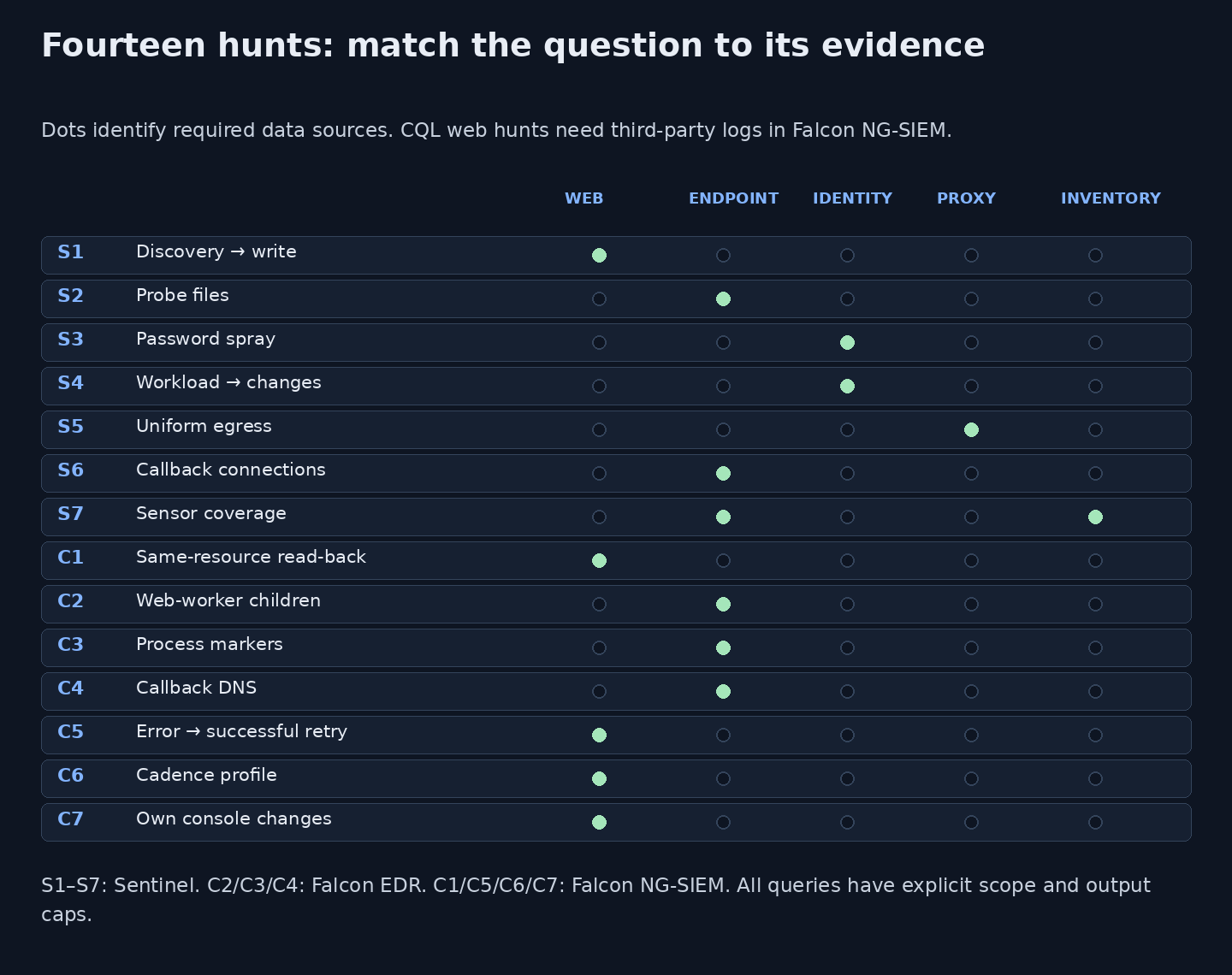
Figure 4. Original coverage map for all fourteen hunts. Missing telemetry is an explicit investigation gap.
Download the query matrix as CSV.
The pack contains seven Sentinel KQL and seven Falcon CQL hunts. All have replacement scopes and an output cap of 100. Sentinel queries use an explicit 24-hour window, except S7's seven-day sensor snapshot. Falcon examples require last 1 hour in the time picker. The web sequence queries cap input at the oldest 10,000 matching events; split busy windows before interpreting a quiet result.
Microsoft's published Azure Monitor table definitions were checked for this revision. In Sentinel's ingested Defender tables the event column is TimeGenerated; Defender Advanced Hunting uses Timestamp. Defender DeviceId, Falcon aid, a public client AppId and a tenant service-principal object ID are different identifiers. Required connectors, retention and read permissions must be present; an unavailable table is a coverage gap, not a negative finding.
Sentinel: seven questions
| Hunt and download | Required evidence |
|---|---|
| S1 · Discovery followed by accepted API writes | ASIM _Im_WebSession |
| S2 · Reported probe-file markers | DeviceFileEvents (Defender ingestion) |
| S3 · Password-spray triage, including failed campaigns | SigninLogs |
| S4 · Workload sign-in followed by directory changes | AADServicePrincipalSignInLogs + AuditLogs |
| S5 · Repeated similarly sized outbound requests | CommonSecurityLog (CEF proxy) |
| S6 · Callback-service connections | DeviceNetworkEvents (Defender ingestion) |
| S7 · Inventory-to-sensor coverage review | DeviceInfo (Defender ingestion) + supplied inventory |
S1 links discovery with accepted API writes. S2 looks for reported file markers; it does not classify a host from a filename. S3 keeps failed sprays visible even when no sign-in succeeds. S4 looks for changes performed by the same application principal after a sign-in. S5 profiles request-sized outbound byte patterns. S6 supplies a process-linked callback-service lead. S7 compares a supplied server inventory with sensor records rather than assuming the EDR console is a complete inventory. For Falcon-only coverage, compare its device inventory export with your CMDB; an event search cannot enumerate assets it has never seen.
Falcon: seven complementary questions
| Hunt and download | Required evidence |
|---|---|
| C1 · Same-resource write/read-back sequences | CPS web logs + neighbor() |
| C2 · Web-worker shell or HTTP-client children | ProcessRollup2 |
| C3 · Reported markers in process command lines | ProcessRollup2 |
| C4 · Callback-service DNS pivots | DnsRequest |
| C5 · Repeated error-to-success write transitions | CPS web logs + neighbor() |
| C6 · Cadence profile for a scoped actor/app | CPS web logs + neighbor() |
| C7 · Changes and exports on your Cairn console | CPS reverse-proxy web logs for your own Cairn |
C2–C4 use native endpoint events. C1 and C5–C7 need web/reverse-proxy logs ingested into Falcon Next-Gen SIEM. An endpoint sensor does not supply the remote operator's HTTP URL paths. A DNS match is a lookup, not proof of an HTTP callback. C1, C5 and C6 require a trustworthy principal field; missing user.id excludes those records. C7 retains console events without that field and needs a separate authentication-audit check. Treat an anonymous/IP-only variant as a separate, lower-confidence investigation.
Markers such as artex-probe-*, ArtexProbe and artx paths are described in the supplied RST account of GTIG. We did not retrieve the original GTIG article in this environment. They are removable leads with legitimate testing false positives. Callback services such as webhook.site are shared infrastructure, not inherently malicious destinations.
5. Six representative queries and how to interpret them
All fourteen full files are linked above and included in the ZIP pack. The pack's README lists fields, scope, tuning, false positives and blind spots for each. Use a source IP from a triaged alert or investigation, one application/host, and a small window first. Check that a known benign event appears before treating absence as meaningful.
S3 · Keep a failed spray visible
The source and client app are explicit. Ten failed accounts in a five-minute bucket is an illustrative starting threshold; it is not derived from a vendor's reported peak rate. MFA challenges are excluded from the selected failure codes. Review successes separately: behind NAT, an unrelated legitimate user may sign in from the same address.
// Illustrative hunt; not executed in a live Sentinel or Falcon tenant.
// Sentinel SigninLogs; one source IP and client AppId. Last 24h; at most 100 buckets.
// 50126=invalid credentials, 50053=locked, 50034=unknown account; MFA challenges are not counted as password failures.
// Ten failed accounts in five minutes is a starting threshold, not an AI signature.
let SourceIP = "REPLACE_WITH_SOURCE_IP";
let ClientApp = "REPLACE_WITH_CLIENT_APP_ID";
SigninLogs
| where TimeGenerated between (ago(24h) .. now())
| where IPAddress == SourceIP and AppId == ClientApp
| summarize Failures=countif(ResultType in ("50126","50053","50034")),
    FailedAccounts=dcountif(UserPrincipalName, ResultType in ("50126","50053","50034")),
    Successes=countif(ResultType == "0"),
    AccountSample=make_set_if(UserPrincipalName, ResultType in ("50126","50053","50034"), 10)
    by IPAddress, AppId, Window=bin(TimeGenerated, 5m)
| where FailedAccounts >= 10
| order by Window desc
| take 100
S4 · Follow application identities into directory changes
Interactive-user MFA alerts leave a workload-identity blind spot. This joins a successful service-principal sign-in with a credential, owner or role operation performed by that same principal within 30 minutes. The join establishes temporal association, not that the same token caused the operation. Confirm the exact audit record and approval, then pivot to Graph and resource data-plane logs. Managed identities and other persistence paths need additional coverage.
// Illustrative hunt; not executed in a live Sentinel or Falcon tenant.
// Sentinel Entra workload sign-ins + directory audit; needs both ingestions and read permission.
// Use a tenant service-principal object ID, not a public client AppId. Last 24h; at most 100 pairs.
let Principal = "REPLACE_WITH_SERVICE_PRINCIPAL_OBJECT_ID";
let Starts = AADServicePrincipalSignInLogs
    | where TimeGenerated between (ago(24h) .. now())
    | where ServicePrincipalId == Principal and ResultType in~ ("0", "Success")
    | project PrincipalId=ServicePrincipalId, SignInTime=TimeGenerated, IPAddress, ResourceDisplayName;
let Changes = AuditLogs
    | where TimeGenerated between (ago(24h) .. now())
    | where Result =~ "success"
    | extend PrincipalId=tostring(InitiatedBy.app.servicePrincipalId)
    | where PrincipalId == Principal
    | where OperationName matches regex @"(?i)(credential|certificate|secret|owner|role)"
    | project PrincipalId, ChangeTime=TimeGenerated, OperationName, TargetResources, CorrelationId;
Starts
| join kind=inner Changes on PrincipalId
| where ChangeTime between (SignInTime .. (SignInTime + 30m))
| project SignInTime, ChangeTime, PrincipalId, IPAddress, ResourceDisplayName,
    OperationName, TargetResources, CorrelationId
| order by ChangeTime desc
| take 100
S5 · Profile repeated similarly sized outbound requests
The supplied RST reference attributes roughly 1,800-byte exfiltration chunks to a ReliaQuest Cairn case. That payload length is not a general network signature. Here, one proxy record must represent one HTTP transaction, and SentBytes must be client-to-destination. Twenty near-uniform records in five minutes is a triage threshold. Backups and telemetry often match; TLS, headers and flow aggregation can hide the pattern.
// Illustrative hunt; not executed in a live Sentinel or Falcon tenant.
// Sentinel CEF proxy: one event per HTTP request; SentBytes must mean client-to-destination bytes.
// Requires CommonSecurityLog, SourceIP, DestinationHostName and SentBytes. Last 24h, at most 100 buckets.
// Near-uniformity is a lead. Do not alert on the ReliaQuest case's reported 1,800-byte payload size alone.
let SourceHost = "REPLACE_WITH_SOURCE_HOST_IP";
let Destination = "REPLACE_WITH_DESTINATION_FQDN";
CommonSecurityLog
| where TimeGenerated between (ago(24h) .. now())
| where SourceIP == SourceHost and DestinationHostName =~ Destination
| where SentBytes >= 256
| summarize Requests=count(), P10=percentile(SentBytes,10), P90=percentile(SentBytes,90),
    TotalSentBytes=sum(SentBytes), UrlSample=make_set(RequestURL,5)
    by SourceIP, DestinationHostName, Window=bin(TimeGenerated,5m)
| where Requests >= 20 and P90 <= P10 * 1.10
| order by TotalSentBytes desc
| take 100
C1 · Verify that a read follows the same resource's write
This groups source, application host, path and principal, preserving intervening methods before comparing adjacent operations. It covers successful PUT/PATCH followed by GET within five seconds. Normal save-and-refresh behaviour matches. If query parameters select objects, add a canonical resource key; if POST returns a new resource URL, correlate the returned object/Location separately. Same-path traffic alone is insufficient in those APIs.
// Illustrative hunt; not executed in a live Sentinel or Falcon tenant.
// Falcon Next-Gen SIEM, CPS web logs. REQUIRED time picker: last 1 hour.
// Replace parser, source IP and host. Requires user.id (principal, never a raw token).
// Resource identifiers must be in url.path; query-selected objects need an extra canonical resource key.
// Only PUT/PATCH pairs; POST creation needs separate Location/object-ID correlation.
// The oldest 10,000 matching input events are retained: split busy windows; output at most 100 groups.
#type="REPLACE_WITH_WEB_PARSER" source.ip="REPLACE_WITH_SOURCE_IP" url.domain="REPLACE_WITH_APP_HOST" user.id=* url.path=*
| sort(@timestamp, order=asc, limit=10000)
| t := @timestamp
| groupBy([source.ip, url.domain, url.path, user.id], function=neighbor(include=[t, http.request.method, http.response.status_code], prefix=prev), limit=max)
| http.request.method=/^GET$/i prev.http.request.method=/^(PUT|PATCH)$/i
| prev.http.response.status_code=/^2[0-9]{2}$/ http.response.status_code=/^2[0-9]{2}$/
| gap := t - prev.t
| test(gap > 0 and gap <= 5000)
| groupBy([source.ip, url.domain, user.id], function=[count(as=ReadBacks), collect([url.path], limit=10)], limit=100)
| ReadBacks >= 3
| head(limit=100)
C2 · Look for execution on the victim server
The useful endpoint question is what the web worker launched on the server you protect. This direct-child filter covers common web-worker names spawning shells or HTTP clients. Inspect process IDs, ancestry, command line and files written. Approved deployment hooks match; indirect children, in-process execution and omitted runtimes can be missed. A hit does not identify ARTEX.
// Illustrative hunt; not executed in a live Sentinel or Falcon tenant.
// Falcon Insight EDR / Advanced Event Search. REQUIRED time picker: last 1 hour.
// One sensor AID; requires ProcessRollup2 with parent name and command-line telemetry.
// Direct web-worker children only; baseline approved maintenance before alerting. Output at most 100 groups.
#event_simpleName=ProcessRollup2 aid="REPLACE_WITH_FALCON_AID"
| ParentBaseFileName=/^(w3wp|httpd|apache2|nginx|php-fpm[0-9.]*|tomcat[0-9]*)(\.exe)?$/i
| FileName=/^(cmd|powershell|pwsh|bash|sh|dash|curl|wget)(\.exe)?$/i
| groupBy([aid, ComputerName, ParentBaseFileName, FileName], function=[count(as=Executions), collect([CommandLine, ParentProcessId, TargetProcessId], limit=10)], limit=100)
| head(limit=100)
C6 · Measure tempo as context
The supplied RST/GTIG description gives 2–25-second bursts; Unit 42 reported 25–31-second pauses in its own cases. Different workloads, models, gateways and timestamp precision can produce different distributions. This query profiles gaps instead of declaring a universal AI band. It includes only gaps from zero to 600 seconds; longer idle intervals are outside this profile. Compare with your application's normal browser, test-runner, monitor and batch activity. Parallel workers and address rotation can blur the profile.
// Illustrative hunt; not executed in a live Sentinel or Falcon tenant.
// Falcon NG-SIEM CPS web logs. REQUIRED time picker: last 1 hour.
// Profile only: no universal 2-25s or 25-31s AI threshold. Compare with the app's baseline and independent evidence.
// One source/app, principal required. Oldest 10,000 inputs retained; at most 100 groups.
#type="REPLACE_WITH_WEB_PARSER" source.ip="REPLACE_WITH_SOURCE_IP" url.domain="REPLACE_WITH_APP_HOST" user.id=* url.path=*
| sort(@timestamp, order=asc, limit=10000)
| t := @timestamp
| groupBy([source.ip, url.domain, user.id], function=neighbor(include=[t, url.path], prefix=prev), limit=max)
| GapSeconds := (t - prev.t) / 1000
| test(GapSeconds >= 0 and GapSeconds <= 600)
| groupBy([source.ip, url.domain, user.id], function=[count(as=Gaps), count(url.path, distinct=true, as=DistinctPaths), min(GapSeconds, as=MinGap), max(GapSeconds, as=MaxGap), percentile(field=GapSeconds, percentiles=[10,50,90])], limit=100)
| Gaps >= 20
| head(limit=100)
6. Build a case across layers
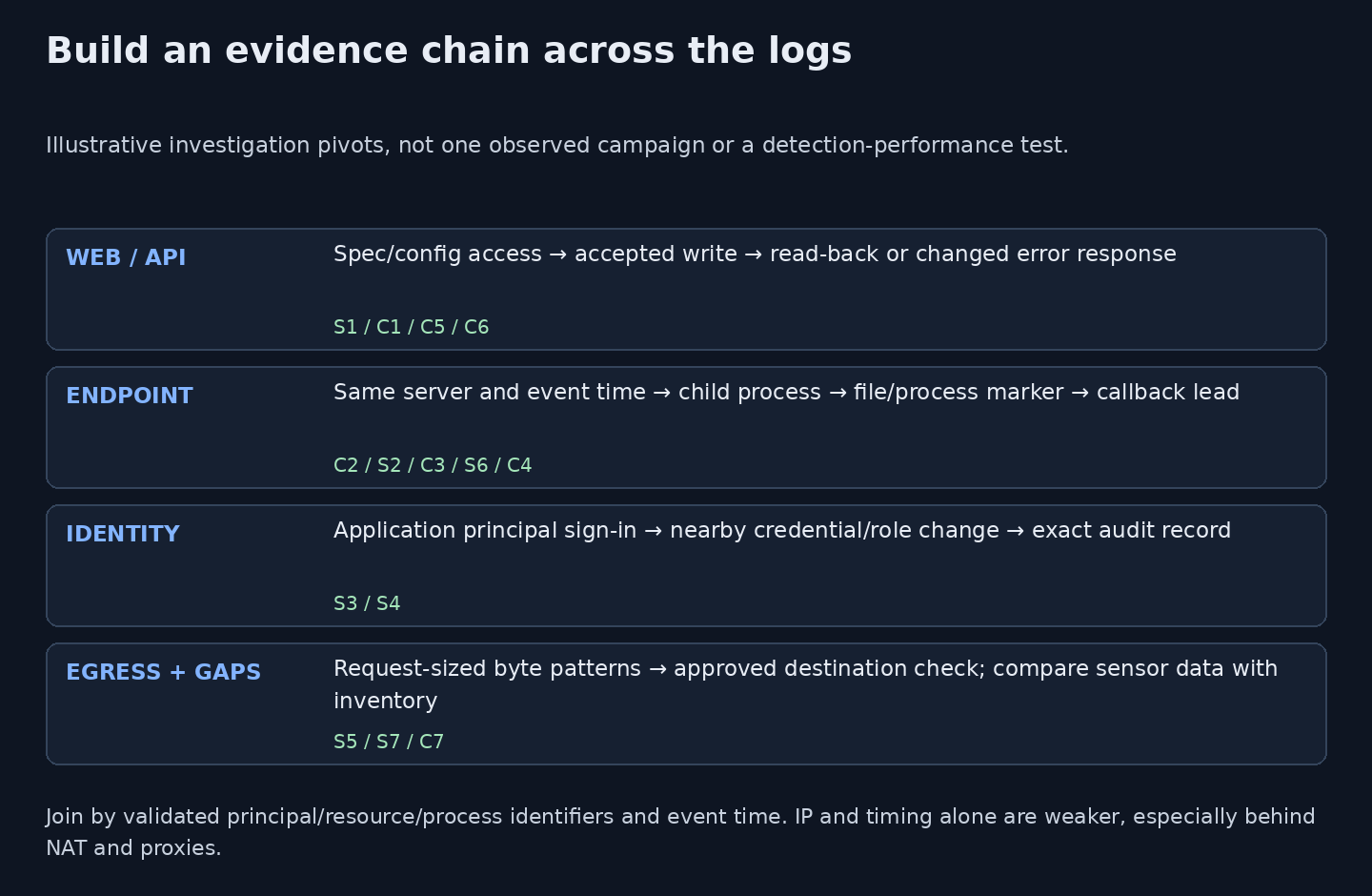
Figure 5. Original conceptual investigation pivots. This does not combine the named reports into one campaign or claim detection performance.
Start with one concrete event and ask for its nearest independent evidence. For an accepted API write, obtain the authenticated principal, exact object ID, before/after state and permission decision. Use the server's event time and process ancestry to investigate execution rather than assuming a matching remote IP proves a process relationship.
For application identity abuse, distinguish the account that signed in, the principal that made a change, the target object and the credential or role added. Removing the original vendor app does not automatically remove credentials added elsewhere. For egress, determine direction and request granularity before interpreting regular sizes. For missing sensors, confirm the hostname, product and freshness against authoritative inventory; an offline host is not evidence that an intruder deliberately selected it.
The campaign reports suggest several useful starting routes. Unit 42's API sequence motivates S1/C1/C5; Microsoft's application-identity account motivates S3/S4; CrowdStrike's post-exploitation account motivates C2 and sensor-coverage review. The supplied RST accounts of Cairn takeover and harness hijacking motivate S5 and C7. Those links explain the hunting questions; they do not merge the reports into a single actor or validate any detection rate.
Record the time range, principal/device/resource identifiers, approved-testing context, exact evidence references, remaining gaps and the owner of the next decision. A collection of weak matches should not silently become a claim that an LLM was used. Attacker-side transcripts or attributable framework artifacts provide different evidence from a request-timing profile.
7. Contain the impact and protect your own harness
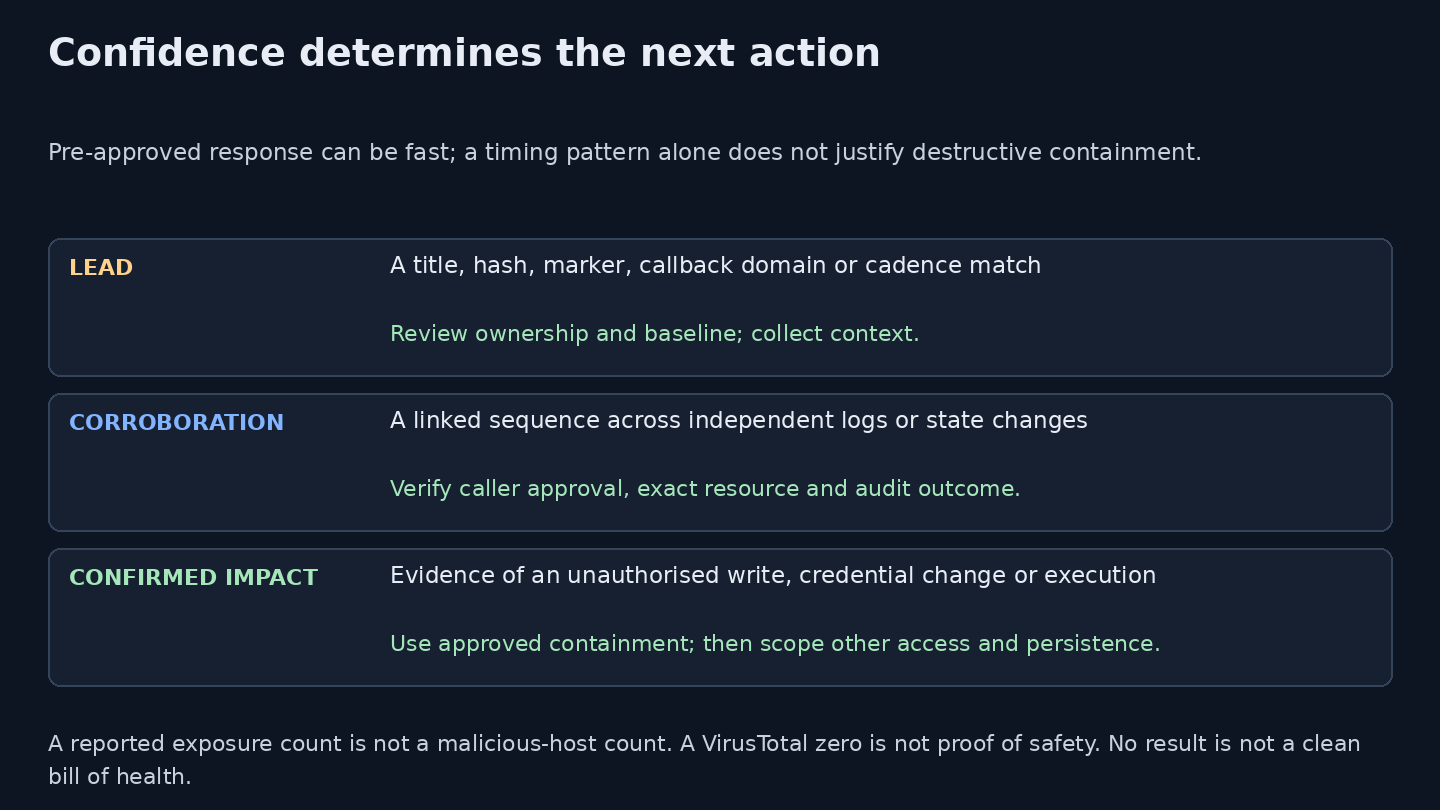
Figure 6. Original confidence-to-action guide. Use approved policies for consequential containment.
Use pre-approved automation where the evidence and business impact justify it. Preserve relevant records and credential-change details, close the unauthorised API route or revoke the affected credential, isolate a compromised server when appropriate, and search for other access or persistence. A password-spray failure bucket or a public console title alone needs investigation and context before disruptive action.
If you legitimately operate these systems, bind the console to a private interface or VPN and put an authenticating proxy over every API and management route, including any WebSocket connection. Change initial credentials, isolate worker execution, restrict Docker/socket privileges, scope cloud and model credentials and monitor their use. A login page protects little if an export or task endpoint bypasses it.
Log project creation, scope changes, exports, privileged actions and authentication at a layer you control. Cairn's checked Compose starts the server with --no-access-log, so deploying it behind a proxy does not by itself mean you retained useful access evidence. C7 assumes those reverse-proxy logs exist. If a harness has been hijacked, scope the operator's LLM, SSH, cloud credentials and stored sessions as well as the console; follow the API exposure response playbook.
For the first hour, monitoring ownership and recovery gates, use the ARTEX response playbook.
Sources, review and limits
4 November 2026 UTC: expanded framework revision. The previous four query downloads and the original ten remain available at their existing URLs. Historical replay results apply only to the original ten rules. The fourteen files in this pack have not been executed in Sentinel, Falcon or a live tenant. Seven KQL files passed Microsoft.Azure.Kusto.Language 12.4.1 syntax parsing; that does not bind a workspace schema or test results. Falcon CQL received static review only.
- [R] Supplied reference: RST Labs, Tempo, not technique: hunting the AI harnesses behind today's intrusions, 2 November 2026. The owner supplied the text, without an original URL. Its census, GTIG/ReliaQuest/NorForge/VULONE case descriptions and reputation observations are attributed as reported; we have not independently reproduced them. The GTIG article URL was found in a published feed, but retrieval was blocked by the environment policy.
- Retrieved directly: Unit 42's ARTEX note, JPCERT/CC's alert, Cairn at the reviewed commit, and PentAGI at the reviewed commit. Source files, not deployed consoles, support the default/configuration observations.
- Secondary reporting reviewed: THN on Microsoft/Storm-0940 and THN on CrowdStrike/Vapor Panda. Their original vendor hosts remain unavailable under the environment policy.
- Schema/review references: Microsoft's Azure Monitor table sources, CPS field convention,
neighbor(). Exact parser mapping and retention still need local validation. Wider context: our AI attack-platform analysis.
No console was accessed, no default password was tried, no internet-wide index query or scan was run, and no harness or malware code was executed. Our new checks were source review, local asset hashing, KQL syntax parsing and publication tests. A quiet hunt means only that the available records did not meet its scoped conditions.