
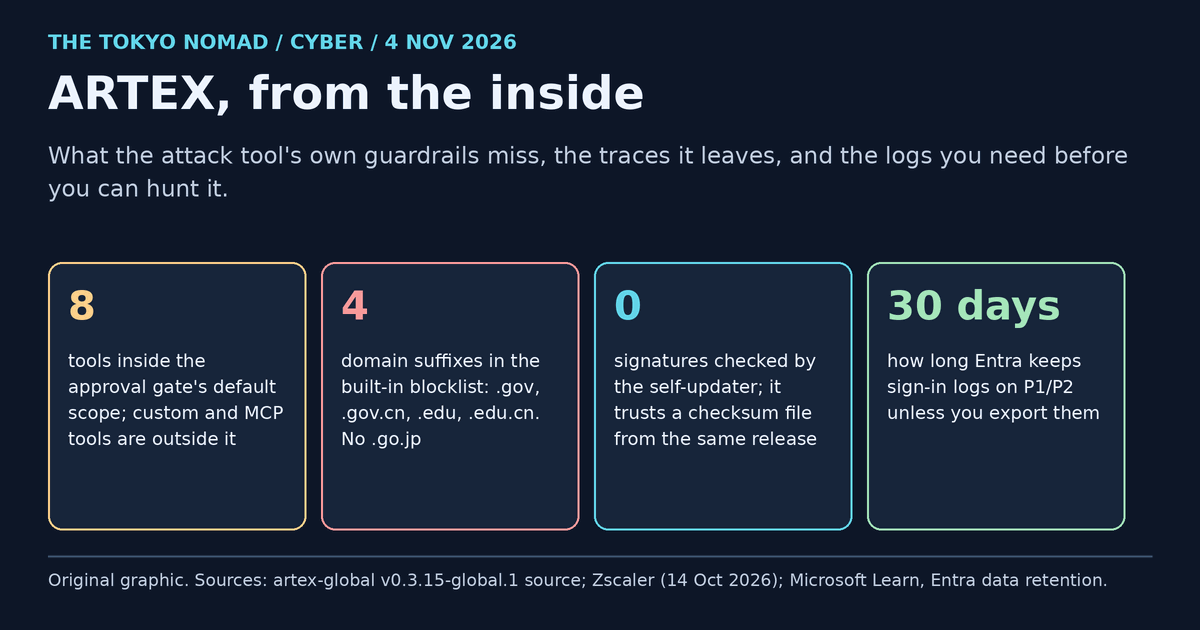
ARTEX's own safety controls will not keep anyone in scope, and most of the logs you would need to see it are off by default. In October 2026, three vendors tied real intrusions to ARTEX, an open-source framework in which AI agents plan and run a penetration test. CrowdStrike and Zscaler linked it to attacks on South Korean financial firms, and Microsoft to Storm-0940's campaign against cloud tenants. CTI Academy then asked a narrower question: how safe is the tool itself? Its lab audit found the scope and approval controls enforced far more narrowly than their names suggest. We read the same release's source code to check that audit independently, looked for the traces the tool leaves, and turned both into what a SOC needs: a log checklist for Microsoft Sentinel and CrowdStrike Falcon, eight readiness and hunting queries, and a matrix of who to alert. This article sits beside our AI harness hunting framework, which has fourteen hunts for the attacks themselves, and our ARTEX response playbook.
What happened, and what is confirmed
Status as of 4 November 2026.
| Report | Date | What it says | Status |
|---|---|---|---|
| CrowdStrike | 7 Oct | An unknown actor used ARTEX against South Korean financial firms from late September. One ARTEX host had an open directory holding Claude Code session histories and ARTEX configuration files, and the actor used nine proxy IPs. | Vendor intelligence; actor not named |
| JPCERT/CC | 8 Oct, updated 23 Oct | Unauthorised access to organisations in Japan, split into API, JSP web-shell and AI-framework cases. | Alert; not every case is tied to ARTEX |
| Zscaler ThreatLabz | 14 Oct | A financially motivated, Chinese-speaking actor (moderate confidence) exploited peripheral web apps and took personal data on about 67,000 people. ARTEX's default blocklist covered government and education domains, not finance. | Vendor assessment |
| Microsoft | 21 Oct, updated 26 Oct | Storm-0940 used ARTEX for scanning, password spraying and OAuth app abuse after the ConnectWise compromise, and in several cases reached privileged cloud access in under three hours. A spray against 327 accounts at eight organisations produced no successful sign-in. | Microsoft's attribution |
| CTI Academy | Early Nov | A lab audit of the public artex-global fork at v0.3.15-global.1: three high and three medium findings about insecure defaults and where controls sit. | Lab research |
| This review | 4 Nov | We read the same tag's code and its agent SDK. All six findings match the code, and we add three details. | Code review; ARTEX not run |
"Attribution" is each vendor's assessment, not a court finding. A tool that many people can download says little about who used it in a given attack.
Why the tool's own controls matter to defenders
- If your red team runs ARTEX or a similar harness, the tool's scope controls are your containment. If they sit in the wrong place, a test can reach production, a cloud metadata service or someone else's network.
- If an attacker runs it, its defaults become fingerprints you can search for, until a fork changes them.
- If anyone exposes it, its recording proxy is a free pivot for whoever finds it.
How ARTEX is built, and where its controls sit
ARTEX Global Edition is a single Go binary with an embedded web interface and a PostgreSQL database. A planner agent breaks a goal into "intents", worker agents run real tools, and the results build a graph of assets and findings. A recording proxy captures every request the tools make. It is a single-user product with one admin account.
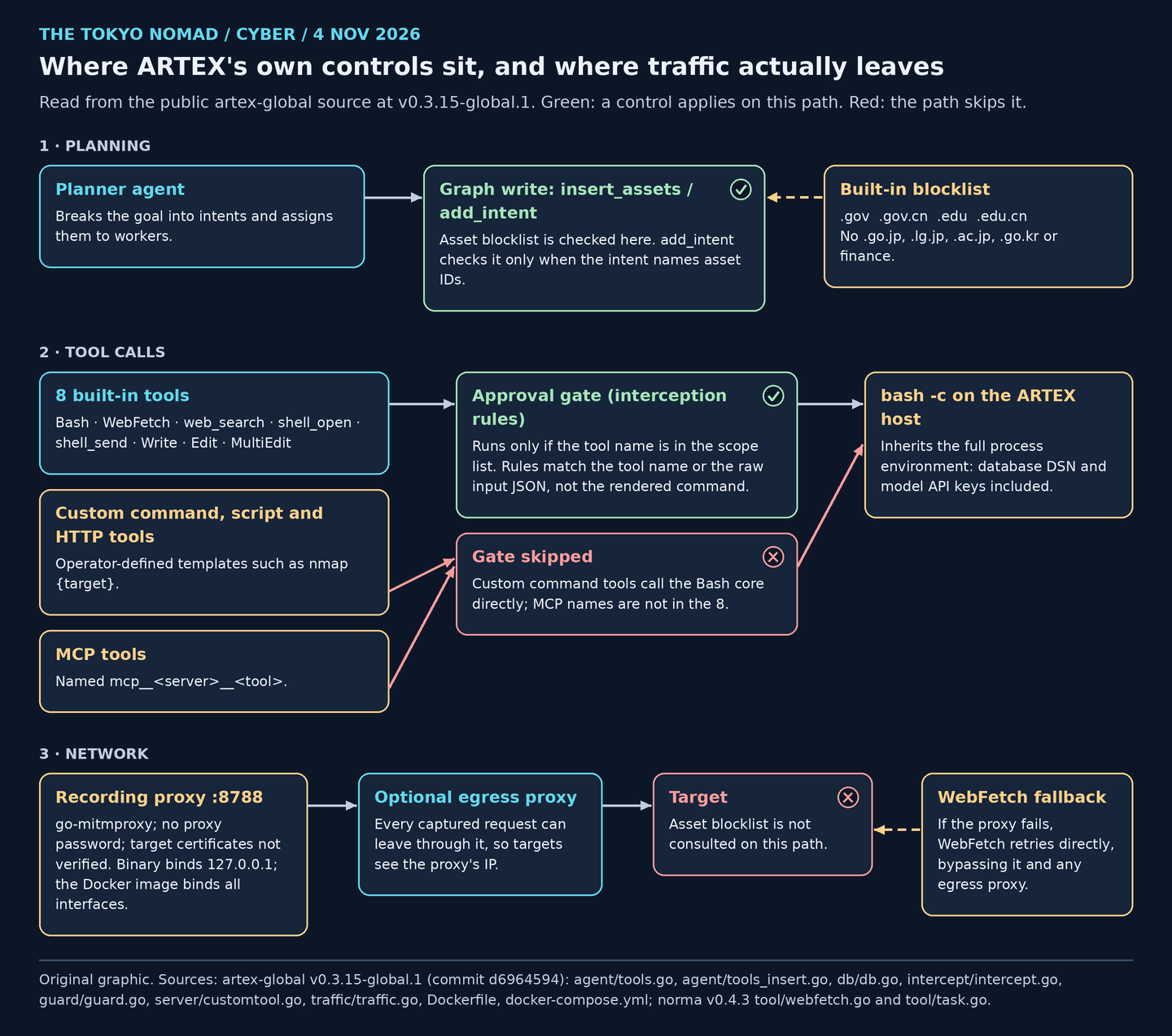
Figure 1. Original graphic from our reading of the v0.3.15-global.1 source. Both controls that matter are checked against graph writes and tool names, not where the request leaves.
How we checked
- Rawest material. We cloned the public artex-global repository and checked out the tag CTI Academy audited,
v0.3.15-global.1(commitd6964594, 14 October 2026). We also read the agent SDK it is built on, norma v0.4.3, from the Go module proxy. The fork's newest commit,fdfb7a1from 14 October, has the same code at every line we cite. - Method. For each control we traced where it is called, not only where it is defined: every caller of the asset gate, the interceptor's scope list and the paths around it, the proxy's options, the updater's integrity check, and every hard-coded user agent. File and line references below are to the tag.
- What we did not do. We did not run ARTEX. We wrote a small test that would call ARTEX's own gate functions with no agent and no network, as CTI Academy did, but our research sandbox blocks running third-party code, so it never ran. Runtime behaviour in this article comes from CTI Academy's lab, and the code paths from our own reading. The upstream builds are private, and forks can differ.
- Independent check. Two separate examinations of the same release: CTI Academy's in a running lab, ours in the source. Where they agree, we write "confirmed".
What the code shows
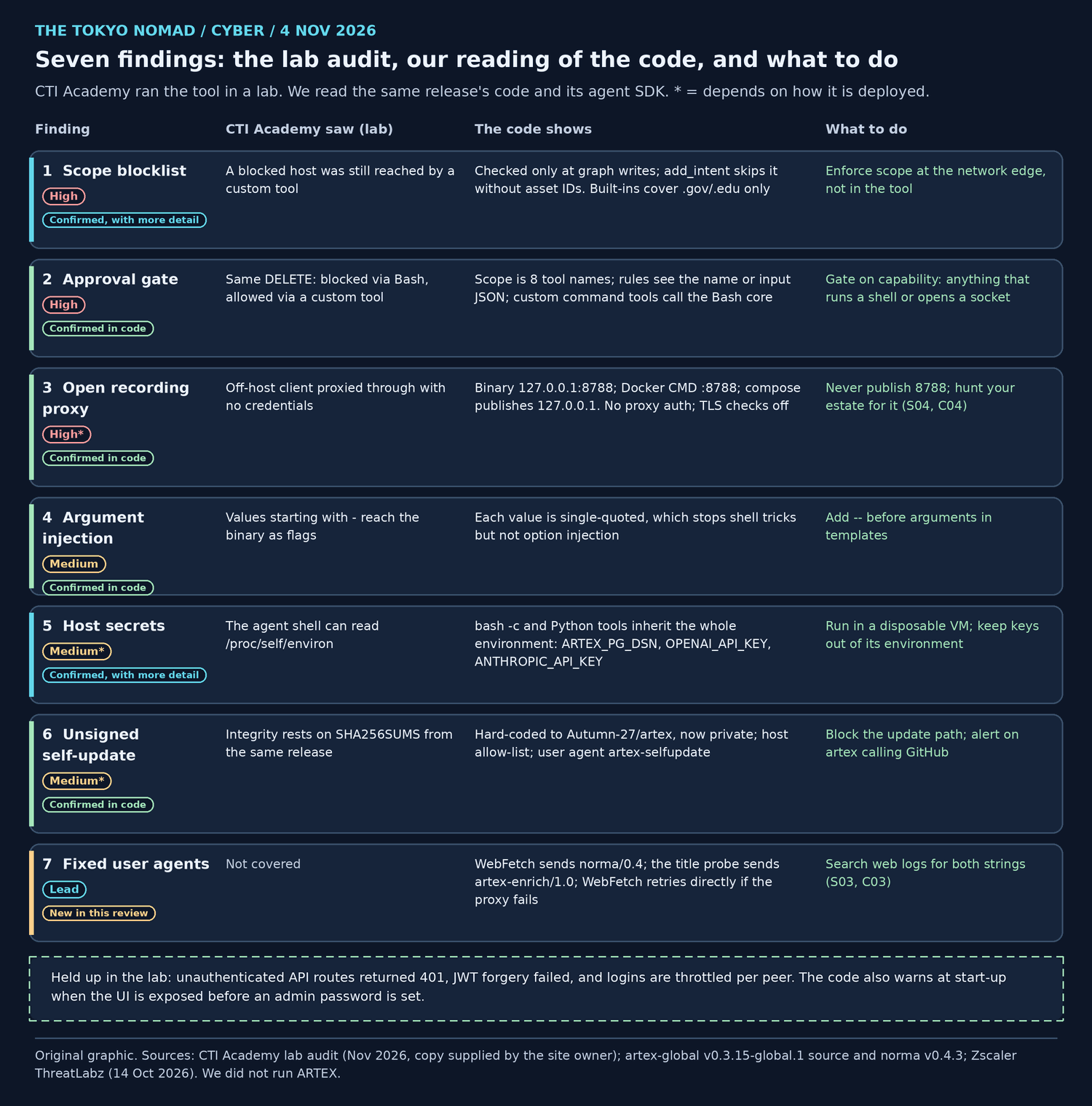
Figure 2. Original graphic. "Confirmed" means the code path matches what CTI Academy saw running.
1. The scope blocklist is checked when the agent records an asset, not when a tool connects
ARTEX's "Asset blocking" rules are evaluated by db.EvaluateAssetGate. In the agent, that function has two callers: insert_assets (agent/tools_insert.go:244) and add_intent (agent/tools.go:1053). Both write to the knowledge graph. No execution tool checks the rules before it opens a connection, which is why CTI Academy's custom tool reached a blocked host.
Two details the audit does not mention. First, add_intent checks the rules only when the intent names asset IDs (len(anchors) > 0); an intent without them is never checked. Second, the rules ARTEX seeds on first start are four domain suffixes: .gov, .gov.cn, .edu and .edu.cn (db/db.go:302–305). Zscaler pointed out that they do not cover financial institutions. They do not cover Japanese or Korean public bodies either: .go.jp, .lg.jp, .ac.jp, .go.kr and .ac.kr are not on the list.
2. The approval gate covers eight tool names
The interception rules run only for tools on defaultEnabledTools: Bash, WebFetch, web_search, shell_open, shell_send, Write, Edit and MultiEdit (intercept/intercept.go:159–163). For any other name, the guard returns before it checks a single rule (guard/guard.go:87). Custom command tools render their template and call the Bash core directly (server/customtool.go:360), and MCP tools are named mcp__<server>__<tool> (mcphttp/client.go:35), so neither is in scope. Even inside the scope, a rule matches the tool name or the raw input JSON (intercept/intercept.go:550–552), not the command a template renders. All 19 built-in deny rules, from rm -rf to HTTP DELETE, match the input.
3. The recording proxy has no password, and the Docker image listens on every interface
The binary's defaults are 127.0.0.1:8787 for the interface and 127.0.0.1:8788 for the proxy (cmd/artex/main.go:55–57). The Docker image overrides both with :8787 and :8788 (Dockerfile:45), which means every interface inside the container. The shipped docker-compose.yml publishes them on 127.0.0.1 only (lines 46–47); a plain docker run -p 8788:8788 does not. The proxy is go-mitmproxy v1.9.2 with no proxy authentication and SslInsecure: true (traffic/traffic.go:206), so it does not check the certificates of the sites it reaches. It can also forward everything through a configured egress proxy (line 221), in which case targets see that proxy's address. CrowdStrike's nine proxy IPs fit that pattern, although its report does not say how they were set up.
4. Quoting stops shell tricks, not option injection
Custom-tool values are wrapped in single quotes (server/customtool.go:508–516). That stops ; or $() injection. A value that starts with - still reaches the target program as an option, as CTI Academy found.
5. Every agent shell inherits the host's secrets
The Bash tool runs bash -c with the full process environment plus the session's proxy settings (norma tool/task.go:140–145 and 566–570), and custom Python tools do the same (server/customtool.go:414). ARTEX reads its database connection string and model keys from that environment: ARTEX_PG_DSN, OPENAI_API_KEY and ANTHROPIC_API_KEY. CTI Academy showed that the shell can read /proc/self/environ. The code shows it does not need to: a plain env prints them. A prompt injection that gets the agent to run one command is enough.
6. Self-update trusts a checksum from the same release
The updater is hard-coded to Autumn-27/artex on GitHub (selfupdate/github.go:15–18). It allows redirects only to five GitHub hosts and checks the download against SHA256SUMS from the same release (selfupdate/stage.go:19 and 66). There is no signature. The upstream repository went private, so the check fails today. Whoever controls that repository in future controls every instance where someone clicks "Update now".
7. Fixed user agents, and a fetch that can bypass the proxy
This one is new. The agent's WebFetch tool sends User-Agent: norma/0.4 (norma tool/webfetch.go:188). ARTEX's enrichment engine, which reads the title of each web asset the agent discovers, sends artex-enrich/1.0 (enrich/enrich.go:233), and the updater sends artex-selfupdate. If a fetch through the proxy fails for a proxy-related reason, WebFetch retries once directly (tool/webfetch.go:190–198). That retry skips the recording proxy and any egress proxy behind it, so it may come from the operator's real address. These strings are easy to change, and most of ARTEX's traffic comes from ordinary tools such as curl, but they cost nothing to search for.
What held up
CTI Academy found no way into the admin API without credentials: protected routes returned 401, JWT forgery failed, and logins are throttled per client. The code also logs a warning at start-up if the interface is bound to a non-loopback address before an admin password is set (server/auth.go:394–408).
The traces ARTEX leaves
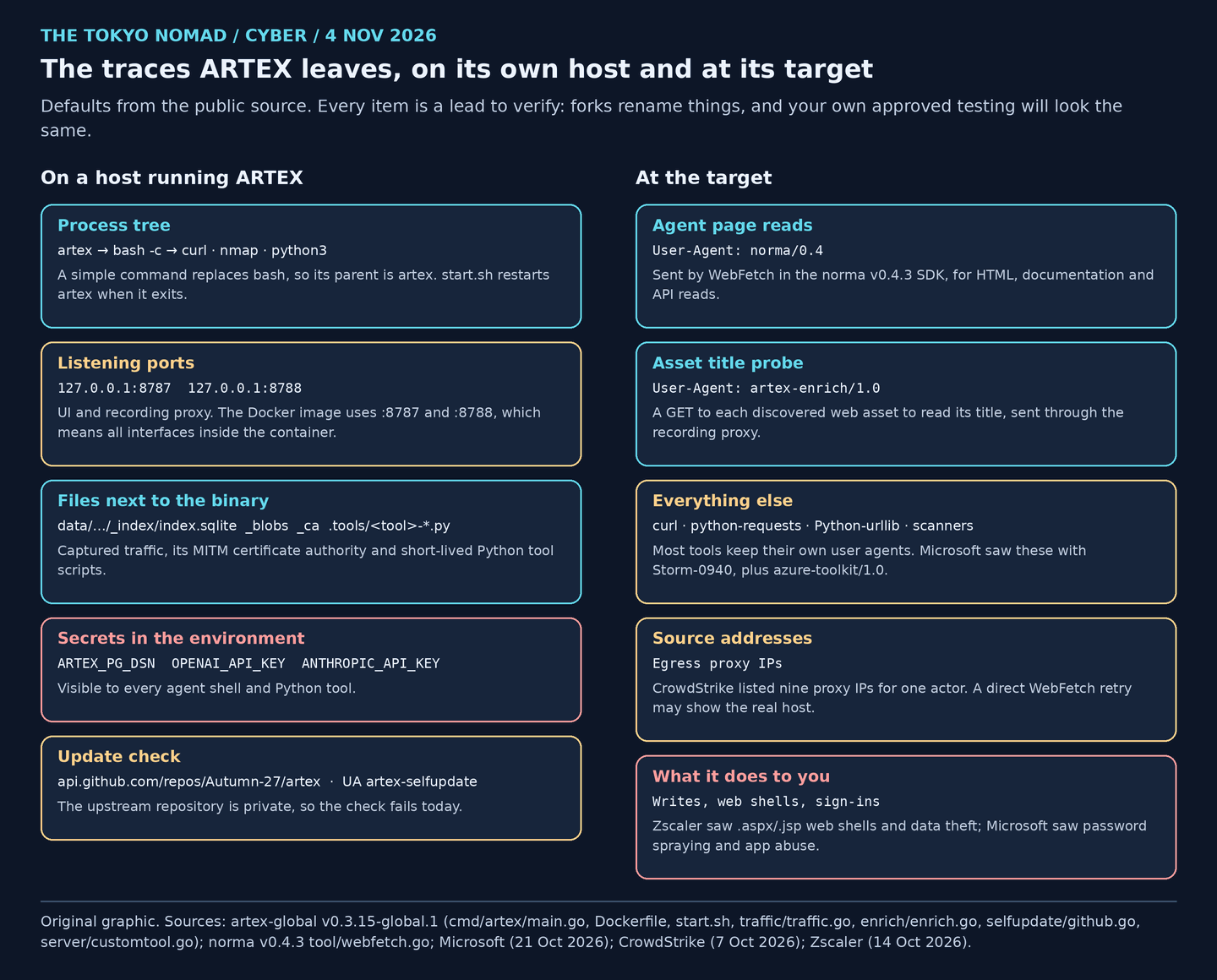
Figure 3. Original graphic. Every item is a lead to verify: forks rename things, and your own approved testing will look the same.
On a host running ARTEX, the defaults are distinctive: a binary called artex that starts bash -c, listeners on 8787 and 8788, a data directory holding the captured traffic and a man-in-the-middle certificate authority, and model keys in the environment. That matters in two cases: someone in your organisation runs ARTEX without approval, or an attacker has installed it on a server they compromised.
At the target, ARTEX looks mostly like the tools it drives. The two fixed user agents are cheap leads. Microsoft's user agents for Storm-0940's sign-ins and Graph calls were generic: python-requests, Python-urllib, curl and azure-toolkit/1.0. The stronger evidence is what happened: accepted writes, new web shells, sign-ins and app changes, which the harness framework's hunts cover.
The log checklist
A hunt that returns nothing is only meaningful if the log it reads was there. Microsoft's guidance for the ConnectWise compromise asks responders to review service-principal sign-ins back to 1 October, Microsoft Graph activity, Entra audit records and Key Vault access. In most tenants, none of those reaches Microsoft Sentinel until someone turns it on.
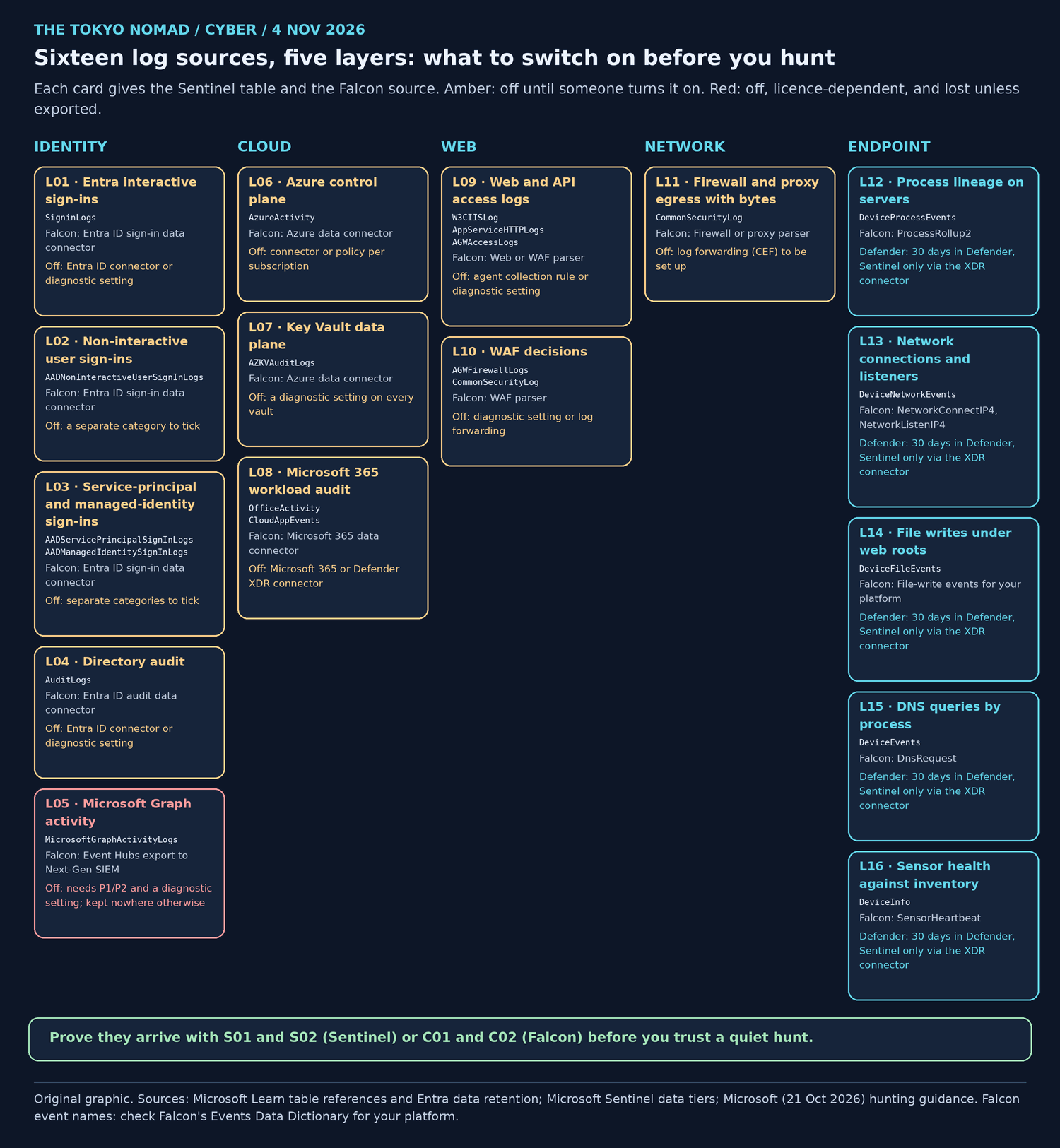
Figure 4. Original graphic. Amber: off until someone turns it on. Red: off, licence-dependent, and lost unless exported.
Retention matters as much as collection. Entra keeps sign-in and audit logs for 7 days on the free tier and 30 days on P1 or P2. Graph activity logs are not kept at all unless you send them somewhere. Defender XDR keeps its hunting data for 30 days, and Sentinel includes 90 days of analytics retention in its price.
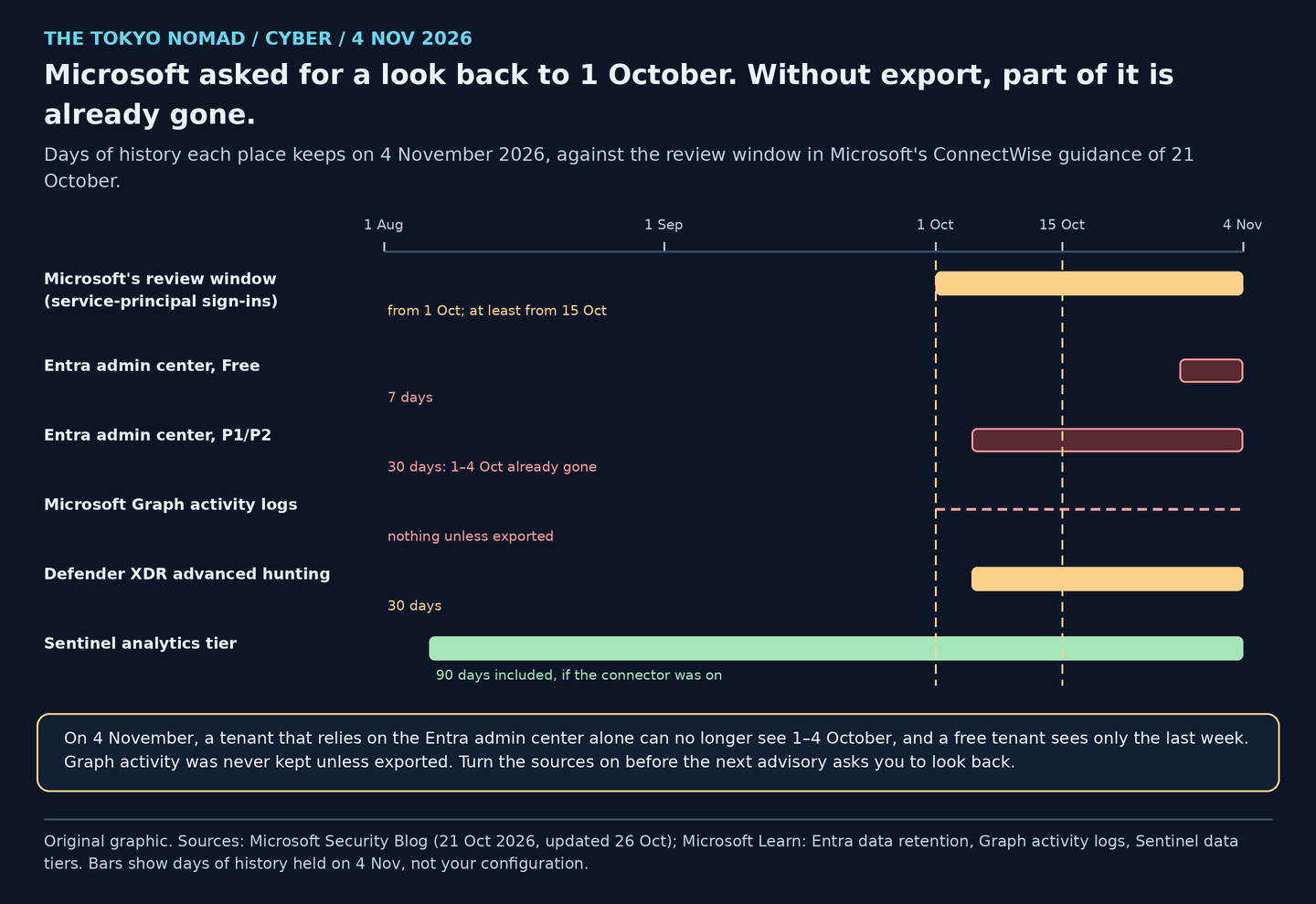
Figure 5. Original graphic. Bars show days of history held on 4 November, not any particular tenant's configuration.
| ID | Log source | Sentinel table | Falcon source | Must contain | How it gets turned on | Keep at least | Owner |
|---|---|---|---|---|---|---|---|
| L01 | Entra interactive sign-ins | SigninLogs |
Entra ID sign-in data connector | Client IP, user agent, user, result | Off: Entra ID connector or diagnostic setting | 90 days (Entra keeps 30) | IAM |
| L02 | Non-interactive user sign-ins | AADNonInteractiveUserSignInLogs |
Entra ID sign-in data connector | Client IP, user, app | Off: a separate category to tick | 90 days | IAM |
| L03 | Service-principal and managed-identity sign-ins | AADServicePrincipalSignInLogs, AADManagedIdentitySignInLogs |
Entra ID sign-in data connector | Client IP, service principal, app ID, result | Off: separate categories to tick | 90 days; Microsoft asked for review back to 1 Oct | IAM |
| L04 | Directory audit | AuditLogs |
Entra ID audit data connector | Operation, initiator, target, result | Off: Entra ID connector or diagnostic setting | 90 days (Entra keeps 30) | IAM |
| L05 | Microsoft Graph activity | MicrosoftGraphActivityLogs |
Event Hubs export to Next-Gen SIEM | Client IP, user agent, app ID, request URI | Off: needs P1/P2 and a diagnostic setting; kept nowhere otherwise | 90 days | IAM |
| L06 | Azure control plane | AzureActivity |
Azure data connector | Caller, operation, resource, result | Off: connector or policy per subscription | 90 days | Cloud platform |
| L07 | Key Vault data plane | AZKVAuditLogs |
Azure data connector | Caller IP, identity, operation, result | Off: a diagnostic setting on every vault | 90 days | Cloud platform |
| L08 | Microsoft 365 workload audit | OfficeActivity, CloudAppEvents |
Microsoft 365 data connector | User or app, operation, client IP | Off: Microsoft 365 or Defender XDR connector | 90 days | Collaboration admins |
| L09 | Web and API access logs | W3CIISLog, AppServiceHTTPLogs, AGWAccessLogs |
Web or WAF parser | Client IP, host, path, method, status, user agent, signed-in user | Off: agent collection rule or diagnostic setting | 90 days | AppSec / web owner |
| L10 | WAF decisions | AGWFirewallLogs, CommonSecurityLog |
WAF parser | Rule, action, client IP, URI | Off: diagnostic setting or log forwarding | 90 days | AppSec / web owner |
| L11 | Firewall and proxy egress with bytes | CommonSecurityLog |
Firewall or proxy parser | Source, destination, bytes out, user agent | Off: log forwarding (CEF) to be set up | 90 days | Network |
| L12 | Process lineage on servers | DeviceProcessEvents |
ProcessRollup2 | Parent, child, command line, account | Defender: 30 days in Defender, Sentinel only via the XDR connector | 90 days for internet-facing servers | EDR |
| L13 | Network connections and listeners | DeviceNetworkEvents |
NetworkConnectIP4, NetworkListenIP4 | Local and remote IP and port, process | Defender: 30 days in Defender, Sentinel only via the XDR connector | 90 days for internet-facing servers | EDR |
| L14 | File writes under web roots | DeviceFileEvents |
File-write events for your platform | Path, process, hash | Defender: 30 days in Defender, Sentinel only via the XDR connector | 90 days for internet-facing servers | EDR |
| L15 | DNS queries by process | DeviceEvents |
DnsRequest | Query name, process | Defender: 30 days in Defender, Sentinel only via the XDR connector | 30 days at least | EDR |
| L16 | Sensor health against inventory | DeviceInfo |
SensorHeartbeat | Device, last seen, health | Defender: 30 days in Defender, Sentinel only via the XDR connector | Daily snapshot | IT Operations |
Download the log checklist (CSV), with blank columns for status, who checked and when. The Falcon column names the Next-Gen SIEM parser or connector, or the EDR event. Connectors vary by licence, so check that one exists for each source; check every EDR event name against Falcon's Events Data Dictionary for your sensor platforms.
Prove the Sentinel sources arrive: S01 and S02
S01 compares the tables you expect with what the workspace has ingested. It reads 90 days of the Usage table, which is cheap, and only the last hour of the tables themselves. MISSING means nothing arrived in 90 days; STALE means nothing in the last day.
// Log-source readiness for hunting ARTEX-style intrusions (The Tokyo Nomad, 4 Nov 2026).
// Read-only. Not executed in a live tenant; checked with Microsoft's Kusto parser against Microsoft Learn schemas.
// Usage gives 90 days of ingestion history per table cheaply; a one-hour scan adds freshness and delay.
// MISSING = no ingestion in 90 days. STALE = nothing in the last 24 hours. Edit Expected to match your estate.
// Defender XDR tables reach Sentinel only through the XDR connector; without it they stay in Defender for 30 days.
let Expected = datatable(Layer:string, DataType:string, UsedFor:string)[
    "Identity", "SigninLogs", "Password spray and sign-in sources",
    "Identity", "AADNonInteractiveUserSignInLogs", "Token use outside interactive sign-ins",
    "Identity", "AADServicePrincipalSignInLogs", "App and service-principal sign-ins",
    "Identity", "AuditLogs", "Credential, role, owner and consent changes",
    "Identity", "MicrosoftGraphActivityLogs", "Graph calls by apps; not kept unless exported",
    "Cloud", "AzureActivity", "Subscription control-plane changes",
    "Cloud", "AZKVAuditLogs", "Key Vault secret reads and key operations",
    "Cloud", "OfficeActivity", "Mailbox, SharePoint and Teams access",
    "Cloud", "CloudAppEvents", "OAuth app activity",
    "Web", "W3CIISLog", "IIS requests with user agent",
    "Web", "AppServiceHTTPLogs", "App Service requests with user agent",
    "Web", "AGWAccessLogs", "Application Gateway requests with user agent",
    "Web", "AGWFirewallLogs", "Application Gateway WAF matches",
    "Network", "CommonSecurityLog", "Firewall, proxy or WAF events (CEF)",
    "Endpoint", "DeviceProcessEvents", "Process lineage on servers",
    "Endpoint", "DeviceNetworkEvents", "Listening ports and outbound connections",
    "Endpoint", "DeviceFileEvents", "Web shells and dropped tools",
    "Endpoint", "DeviceEvents", "DNS answers and other endpoint events",
    "Endpoint", "DeviceInfo", "Sensor health against inventory"
];
let History = Usage
    | where TimeGenerated > ago(90d)
    | summarize FirstIngest=min(TimeGenerated), LastIngest=max(TimeGenerated),
        DaysWithData=dcount(bin(TimeGenerated, 1d)), TotalMB=sum(Quantity) by DataType
    | extend AvgDailyMB=round(TotalMB / DaysWithData, 2);
let Fresh = union withsource=DataType isfuzzy=true
        SigninLogs, AADNonInteractiveUserSignInLogs, AADServicePrincipalSignInLogs, AuditLogs,
        MicrosoftGraphActivityLogs, AzureActivity, AZKVAuditLogs, OfficeActivity, CloudAppEvents,
        W3CIISLog, AppServiceHTTPLogs, AGWAccessLogs, AGWFirewallLogs, CommonSecurityLog,
        DeviceProcessEvents, DeviceNetworkEvents, DeviceFileEvents, DeviceEvents, DeviceInfo
    | where TimeGenerated > ago(1h)
    | summarize Newest=max(TimeGenerated),
        MedianDelayMin=round(percentile(datetime_diff("second", ingestion_time(), TimeGenerated) / 60.0, 50), 1) by DataType;
Expected
| join kind=leftouter History on DataType
| join kind=leftouter Fresh on DataType
| extend Status=case(isnull(LastIngest), "MISSING", LastIngest < ago(1d), "STALE", "FLOWING")
| extend Rank=case(Status == "MISSING", 0, Status == "STALE", 1, 2)
| order by Rank asc, Layer asc, DataType asc
| project Layer, DataType, Status, FirstIngest, LastIngest, DaysWithData, AvgDailyMB, Newest, MedianDelayMin, UsedFor
| take 100
S02 checks the fields the hunts join on. A web log without user agents cannot answer S03, and a sign-in log without IP addresses cannot answer anything about where an attack came from.
// Field readiness: are the fields the hunts join on actually filled? (The Tokyo Nomad, 4 Nov 2026)
// Read-only; last hour. Not executed in a live tenant; checked with Microsoft's Kusto parser against Microsoft Learn schemas.
// An empty field is a coverage gap, not a clean result. A blank percentage means the table has no such field.
// Tables you do not collect are skipped (isfuzzy); compare the output with the log checklist.
let Window = 1h;
union isfuzzy=true
    (SigninLogs | where TimeGenerated > ago(Window)
        | summarize Rows=count(), ClientIP=countif(isnotempty(IPAddress)), UserAgent=countif(isnotempty(UserAgent)), Principal=countif(isnotempty(UserPrincipalName))
        | extend Source="SigninLogs"),
    (AADServicePrincipalSignInLogs | where TimeGenerated > ago(Window)
        | summarize Rows=count(), ClientIP=countif(isnotempty(IPAddress)), Principal=countif(isnotempty(ServicePrincipalId))
        | extend Source="AADServicePrincipalSignInLogs", UserAgent=long(null)),
    (MicrosoftGraphActivityLogs | where TimeGenerated > ago(Window)
        | summarize Rows=count(), ClientIP=countif(isnotempty(IPAddress)), UserAgent=countif(isnotempty(UserAgent)), Principal=countif(isnotempty(AppId))
        | extend Source="MicrosoftGraphActivityLogs"),
    (W3CIISLog | where TimeGenerated > ago(Window)
        | summarize Rows=count(), ClientIP=countif(isnotempty(cIP)), UserAgent=countif(isnotempty(csUserAgent)), Principal=countif(isnotempty(csUserName) and csUserName != "-")
        | extend Source="W3CIISLog"),
    (AppServiceHTTPLogs | where TimeGenerated > ago(Window)
        | summarize Rows=count(), ClientIP=countif(isnotempty(CIp)), UserAgent=countif(isnotempty(UserAgent)), Principal=countif(isnotempty(CsUsername) and CsUsername != "-")
        | extend Source="AppServiceHTTPLogs"),
    (AGWAccessLogs | where TimeGenerated > ago(Window)
        | summarize Rows=count(), ClientIP=countif(isnotempty(ClientIp)), UserAgent=countif(isnotempty(UserAgent))
        | extend Source="AGWAccessLogs", Principal=long(null)),
    (CommonSecurityLog | where TimeGenerated > ago(Window)
        | summarize Rows=count(), ClientIP=countif(isnotempty(SourceIP)), UserAgent=countif(isnotempty(RequestClientApplication)), Principal=countif(isnotempty(SourceUserName))
        | extend Source="CommonSecurityLog")
| where Rows > 0
| extend ClientIPPct=round(100.0 * ClientIP / Rows, 1), UserAgentPct=round(100.0 * UserAgent / Rows, 1), PrincipalPct=round(100.0 * Principal / Rows, 1)
| project Source, Rows, ClientIPPct, UserAgentPct, PrincipalPct
| order by Source asc
Prove the Falcon sources arrive: C01 and C02
C01 counts the EDR event types the hunts need, by platform and by sensor. Compare the sensor counts with your server inventory: a server that sends no NetworkListenIP4 events cannot answer C04.
// Falcon EDR readiness: are the event types the ARTEX hunts need arriving? (The Tokyo Nomad, 4 Nov 2026)
// Read-only. REQUIRED time picker: last 24 hours. Static review only; not executed in a live Falcon tenant.
// Compare Sensors with your server inventory per platform. A missing event type is a coverage gap, not a clean result.
// Check each event name against Falcon's Events Data Dictionary for your sensor versions and platforms.
#event_simpleName=/^(ProcessRollup2|NetworkConnectIP4|NetworkListenIP4|DnsRequest|SensorHeartbeat)$/
| groupBy([#event_simpleName, event_platform], function=[count(as=Events), count(aid, distinct=true, as=Sensors), max(@timestamp, as=LastSeen)], limit=100)
| LastSeenUTC := formatTime("%Y-%m-%d %H:%M", field=LastSeen, timezone="UTC")
| select([#event_simpleName, event_platform, Events, Sensors, LastSeenUTC])
| sort(#event_simpleName, order=asc, limit=100)
C02 does the same for third-party data in Next-Gen SIEM. Replace the parser names with your identity, web and firewall parsers.
// Falcon Next-Gen SIEM readiness: do third-party sources arrive with the fields the hunts need? (The Tokyo Nomad, 4 Nov 2026)
// Read-only. REQUIRED time picker: last 1 hour. Static review only; not executed in a live Falcon tenant.
// Replace the parser names with yours (identity, web/WAF, firewall/proxy). Fields follow the parsers' ECS-style names.
// A parser with no rows, or with few rows carrying a user agent or source IP, is a coverage gap.
in(field="#type", values=["REPLACE_WITH_IDENTITY_PARSER", "REPLACE_WITH_WEB_PARSER", "REPLACE_WITH_FIREWALL_PARSER"])
| case { user_agent.original=* | HasUA := 1 ; * | HasUA := 0 ; }
| case { source.ip=* | HasIP := 1 ; * | HasIP := 0 ; }
| case { user.name=* | HasUser := 1 ; * | HasUser := 0 ; }
| groupBy([#type], function=[count(as=Events), sum(HasUA, as=WithUserAgent), sum(HasIP, as=WithSourceIP), sum(HasUser, as=WithUser), max(@timestamp, as=LastSeen)], limit=100)
| LastSeenUTC := formatTime("%Y-%m-%d %H:%M", field=LastSeen, timezone="UTC")
| select([#type, Events, WithUserAgent, WithSourceIP, WithUser, LastSeenUTC])
Hunting the tool's own traces
S03 and C03: ARTEX's fixed user agents
These look for the two user agents in your web logs. Expect your own approved testing to match. A hit with no accepted change is alert A02 below; a hit next to an accepted write is A03.
// ARTEX's fixed user agents in web logs (The Tokyo Nomad, 4 Nov 2026). Read-only; last 24 hours.
// Not executed in a live tenant; checked with Microsoft's Kusto parser against Microsoft Learn schemas.
// Strings from the public artex-global source at v0.3.15-global.1 (d6964594) and its norma v0.4.3 SDK:
//   norma/0.4 = agent WebFetch; artex-enrich/1.0 = asset title probe; artex-selfupdate = updater (GitHub only).
// A match is a lead: a fork can change these strings, and your own approved testing will match too.
// Most ARTEX tools are curl, python or scanners with their own user agents; absence proves nothing.
let Window = 24h;
let ArtexAgents = @"(?i)^(?:norma/0\.|artex-enrich/|artex-selfupdate)";
union isfuzzy=true
    (W3CIISLog | where TimeGenerated > ago(Window)
        | project TimeGenerated, Source="W3CIISLog", ClientIP=cIP, Host=csHost, Path=csUriStem, Status=tostring(scStatus), UserAgent=csUserAgent),
    (AppServiceHTTPLogs | where TimeGenerated > ago(Window)
        | project TimeGenerated, Source="AppServiceHTTPLogs", ClientIP=CIp, Host=CsHost, Path=CsUriStem, Status=tostring(ScStatus), UserAgent),
    (AGWAccessLogs | where TimeGenerated > ago(Window)
        | project TimeGenerated, Source="AGWAccessLogs", ClientIP=ClientIp, Host, Path=RequestUri, Status=tostring(HttpStatus), UserAgent),
    (CommonSecurityLog | where TimeGenerated > ago(Window)
        | project TimeGenerated, Source="CommonSecurityLog", ClientIP=SourceIP, Host=DestinationHostName, Path=RequestURL, Status="", UserAgent=RequestClientApplication)
| where UserAgent matches regex ArtexAgents
| summarize FirstSeen=min(TimeGenerated), LastSeen=max(TimeGenerated), Requests=count(),
    Statuses=make_set(Status, 10), Paths=make_set(Path, 10) by Source, ClientIP, Host, UserAgent
| order by LastSeen desc
| take 100
// ARTEX's fixed user agents in web logs, Falcon Next-Gen SIEM (The Tokyo Nomad, 4 Nov 2026).
// Read-only. REQUIRED time picker: last 24 hours. Static review only; not executed in a live Falcon tenant.
// norma/0.4 = agent WebFetch; artex-enrich/1.0 = asset title probe; artex-selfupdate = updater (GitHub only).
// A match is a lead: forks can change these strings and approved testing will match. Absence proves nothing.
#type="REPLACE_WITH_WEB_PARSER"
| user_agent.original=/^(?:norma\/0\.|artex-enrich\/|artex-selfupdate)/i
| groupBy([source.ip, url.domain, user_agent.original], function=[count(as=Requests), min(@timestamp, as=FirstSeen), max(@timestamp, as=LastSeen), collect([url.path, http.response.status_code], limit=10)], limit=100)
| head(limit=100)
S04 and C04: a host in your estate running ARTEX
These look for the default binary name starting child processes, listeners on 8787 or 8788, and calls from the ARTEX process to the cloud metadata address or to GitHub's API. Microsoft Defender's ListeningConnectionCreated and Falcon's NetworkListenIP4 events must be arriving from the host for the listener check to work; C01 and S01 tell you whether they are.
// Hosts in your estate that look like they run ARTEX (The Tokyo Nomad, 4 Nov 2026). Read-only; last 24 hours.
// Not executed in a live tenant; checked with Microsoft's Kusto parser against Microsoft Learn schemas.
// Defaults from the public artex-global source at v0.3.15-global.1: binary "artex", UI on 8787, recording proxy on 8788,
// tools started with "bash -c" (a simple command replaces bash, so its parent is artex), updater calls api.github.com.
// Leads, not verdicts: a renamed binary or new -addr/-proxy flags defeats these checks, and an approved
// red-team host will match. Confirm the owner and authorisation before containment.
let Window = 24h;
let ArtexNames = dynamic(["artex", "artex.exe"]);
let Listeners = DeviceNetworkEvents
    | where TimeGenerated > ago(Window)
    | where ActionType == "ListeningConnectionCreated" and LocalPort in (8787, 8788)
    | project TimeGenerated, DeviceId, DeviceName, Evidence=strcat("listening on ", LocalIP, ":", tostring(LocalPort), " by ", InitiatingProcessFileName), Detail=InitiatingProcessCommandLine;
let Children = DeviceProcessEvents
    | where TimeGenerated > ago(Window)
    | where InitiatingProcessFileName in~ (ArtexNames)
    | project TimeGenerated, DeviceId, DeviceName, Evidence=strcat("artex started ", FileName), Detail=ProcessCommandLine;
let Outbound = DeviceNetworkEvents
    | where TimeGenerated > ago(Window)
    | where InitiatingProcessFileName in~ (ArtexNames) or InitiatingProcessParentFileName in~ (ArtexNames)
    | where RemoteIP == "169.254.169.254" or RemoteUrl has "api.github.com"
    | project TimeGenerated, DeviceId, DeviceName, Evidence=strcat(InitiatingProcessFileName, " connected to ", iff(isempty(RemoteUrl), RemoteIP, RemoteUrl)), Detail=InitiatingProcessCommandLine;
union Listeners, Children, Outbound
| summarize FirstSeen=min(TimeGenerated), LastSeen=max(TimeGenerated), Events=count(),
    Evidence=make_set(Evidence, 20), Details=make_set(Detail, 5) by DeviceId, DeviceName
| order by LastSeen desc
| take 100
// Hosts that look like they run ARTEX, Falcon EDR (The Tokyo Nomad, 4 Nov 2026).
// Read-only. REQUIRED time picker: last 24 hours. Static review only; not executed in a live Falcon tenant.
// Defaults from the public artex-global source at v0.3.15-global.1: binary "artex", UI on 8787, recording proxy on 8788.
// Leads, not verdicts: renamed binaries and changed ports defeat this, and approved red-team hosts match.
// Pivot a listener's ContextProcessId to ProcessRollup2 TargetProcessId to name the listening process.
#event_simpleName=/^(ProcessRollup2|NetworkListenIP4)$/
| case {
    #event_simpleName=ProcessRollup2 ParentBaseFileName=/^artex(\.exe)?$/i | Evidence := format("artex started %s", field=[FileName]) ;
    #event_simpleName=NetworkListenIP4 LocalPort=/^878[78]$/ | Evidence := format("listening on port %s", field=[LocalPort]) ;
  }
| groupBy([aid, ComputerName, Evidence], function=[count(as=Events), min(@timestamp, as=FirstSeen), max(@timestamp, as=LastSeen), collect([CommandLine], limit=5)], limit=100)
| head(limit=100)
For the attacks themselves, use the fourteen hunts in the harness framework: discovery followed by accepted writes (S1), probe files (S2), password spraying (S3), app identities changing the directory (S4), uniform egress (S5) and the Falcon equivalents.
Who to alert, and when to call for help
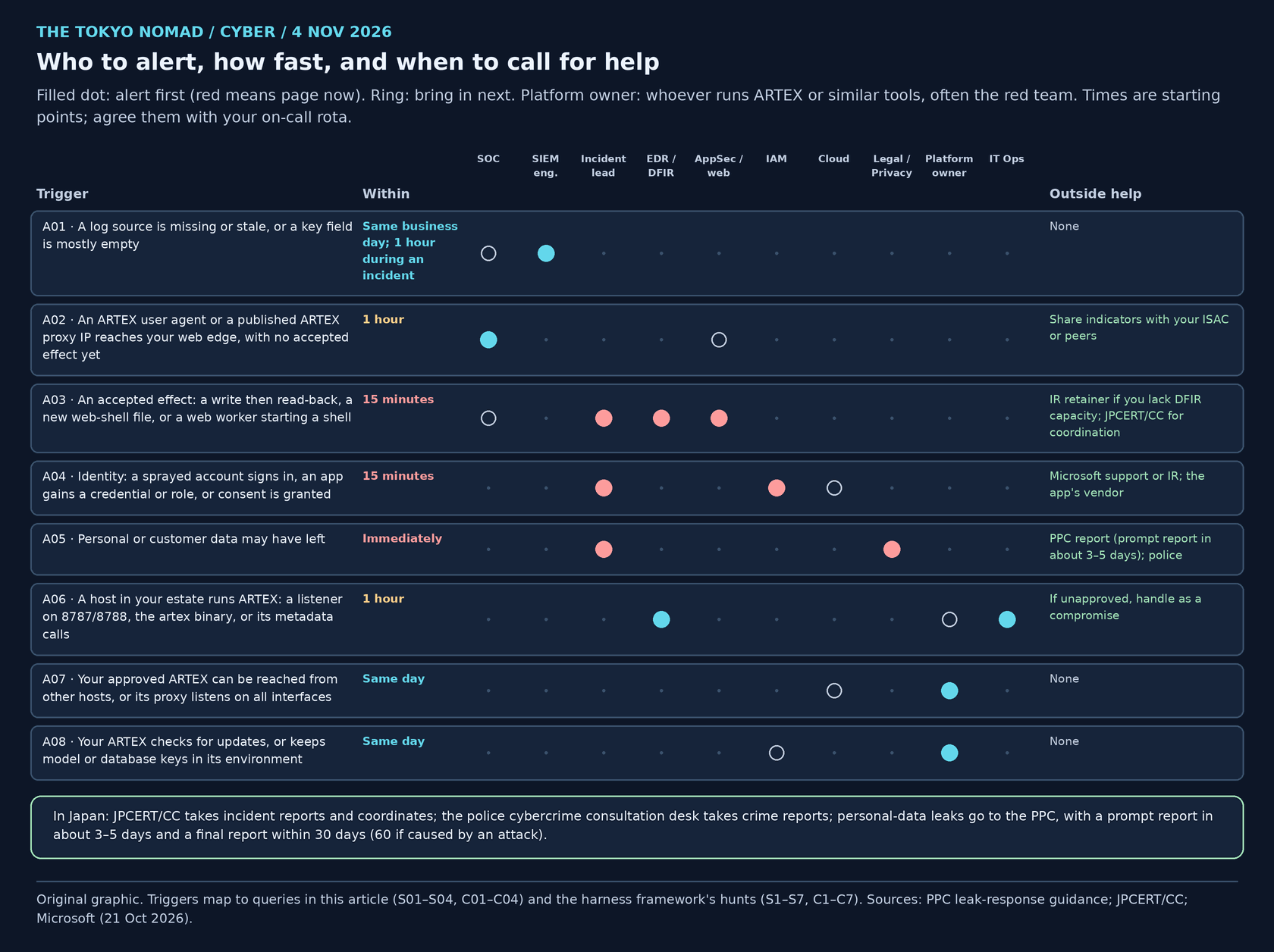
Figure 6. Original graphic. "Platform owner" means whoever runs ARTEX or similar tools in your organisation, often the red team.
| ID | Trigger | Seen in | Alert first | Within | Then involve | Outside help |
|---|---|---|---|---|---|---|
| A01 | A log source is missing or stale, or a key field is mostly empty | S01, S02, C01, C02 | SIEM engineering + the source's owner | Same business day; 1 hour during an incident | SOC lead, if a hunt or rule depends on it | None |
| A02 | An ARTEX user agent or a published ARTEX proxy IP reaches your web edge, with no accepted effect yet | S03, C03 | SOC | 1 hour | AppSec / web owner | Share indicators with your ISAC or peers |
| A03 | An accepted effect: a write then read-back, a new web-shell file, or a web worker starting a shell | Harness S1, S2, C1, C2 | Incident lead (page) + EDR / DFIR + AppSec | 15 minutes | Owner of the affected data | IR retainer if you lack DFIR capacity; JPCERT/CC for coordination |
| A04 | Identity: a sprayed account signs in, an app gains a credential or role, or consent is granted | Harness S3, S4; Microsoft alert titles | IAM + incident lead | 15 minutes | Cloud platform; third-party risk if a vendor's app is involved | Microsoft support or IR; the app's vendor |
| A05 | Personal or customer data may have left | Harness S5; DLP; application logs | Legal / Privacy + incident lead | Immediately | Executive owner and communications | PPC report (prompt report in about 3–5 days); police |
| A06 | A host in your estate runs ARTEX: a listener on 8787/8788, the artex binary, or its metadata calls | S04, C04 | EDR + IT Operations | 1 hour | Red-team owner to confirm approval; insider-risk process if unapproved | If unapproved, handle as a compromise |
| A07 | Your approved ARTEX can be reached from other hosts, or its proxy listens on all interfaces | S04, C04; your own exposure inventory | Platform owner + network | Same day | Security architecture | None |
| A08 | Your ARTEX checks for updates, or keeps model or database keys in its environment | S04; configuration review | Platform owner | Same day | IAM, to rotate the keys | None |
Download the alert matrix (CSV), with blank columns for the named owner, contact and the date you last tested the route. The deadlines are starting points for a team with an on-call rota; agree them with each owner. The response playbook covers what happens after the first call.
When to call for help in Japan:
- JPCERT/CC takes incident reports and helps coordinate with the other organisations involved (report form, Japanese). Its alert of 8 October covers the recent intrusions in Japan.
- The police take crime reports through the cybercrime consultation desks (Japanese).
- The Personal Information Protection Commission (PPC) must be told about qualifying personal-data leaks: a prompt report within about 3–5 days of learning of the incident, and a final report within 30 days, or 60 days when the cause is a wrongful act such as an attack (PPC, Japanese).
- Vendors and retainers: Microsoft's and CrowdStrike's incident response services, your IR retainer or cyber insurer, and the vendor of any third-party app involved, as with ConnectWise.
The attacker's playbook
How an operator uses ARTEX, with MITRE ATT&CK techniques. Where we chose the nearest match rather than the source's own label, we say so.
- Obtain the capability: a public fork and a model API (T1588.007, Obtain Capabilities: Artificial Intelligence, as CrowdStrike labels it). CrowdStrike saw DeepSeek reached through an API reseller.
- Stand up infrastructure: virtual private servers and a chain of egress proxies (T1583.003, Virtual Private Server; T1090, Proxy). The recording proxy's egress setting makes this one line of configuration.
- Find and probe targets: the title probe and WebFetch read every web asset the agent finds (T1595.002, Vulnerability Scanning, our nearest match).
- Get in: exploit peripheral web applications and plant web shells, as Zscaler reports (T1190, Exploit Public-Facing Application; T1505.003, Web Shell); or spray passwords and abuse OAuth apps, as Microsoft reports (T1110.003, Password Spraying; T1078.004, Cloud Accounts).
- Stay: give an app new credentials or a higher role (T1098.001, Additional Cloud Credentials; T1098.003, Additional Cloud Roles), which Microsoft's alert titles describe.
- Take the data: Zscaler saw structured personal data sent out over HTTPS (T1041, Exfiltration Over C2 Channel, our nearest match).
Abusing someone else's ARTEX. An instance started from the Docker image with a published 8788 is an unauthenticated proxy: anyone who finds it can reach the networks behind it, including a cloud metadata service (T1090, Proxy; T1552.005, Cloud Instance Metadata API).
What does not change, whatever the fork: the agent needs a network path to its model and to its target, and its effects land in your identity, web and endpoint logs. Rename the binary and change the user agents, and the accepted writes, sign-ins and new files are still there to find, if the logs are.
The defender's playbook
- Today: prove the logs. Run S01 and S02, or C01 and C02. Send every MISSING or STALE source, and every field below about 90%, to its owner with a date (alert A01).
- This week: turn on what Microsoft's guidance needs. Service-principal and managed-identity sign-ins, Microsoft Graph activity (P1 or P2), Entra audit, Key Vault diagnostics on every vault, and web logs that keep the user agent and the signed-in user. Set those tables to 90 days in Sentinel.
- Every day: hunt the traces. Run S03 and S04, or C03 and C04, and the harness framework's fourteen hunts for effects. Expect matches from approved testing and record them, so a real one stands out.
- If you run ARTEX yourselves, contain it from outside:
- Run it in a disposable VM with no route to production except the engagement's targets. Enforce scope with an egress allow-list, and block
169.254.169.254and internal ranges unless they are in scope. - Bind 8787 and 8788 to loopback, never publish 8788, and put the interface behind your single sign-on.
- Give it its own database and a model key with a spending cap, rotate both after each engagement, and keep every other secret out of its environment.
- Treat custom and MCP tools as unapproved until reviewed, and put
--before arguments in command templates. - Block the host's access to GitHub and update only by rebuilding from source you have checked.
- Keep the guard's audit log, the interception history and the recording proxy's traffic index with the engagement record. They are your evidence of what the test did.
- Run it in a disposable VM with no route to production except the engagement's targets. Enforce scope with an egress allow-list, and block
- Now: agree the alert matrix. Name an owner and a contact for A01 to A08, and test each route once before you need it.
What remains unknown
- How the private upstream builds differ from the fork. CrowdStrike and Microsoft saw the tool in the wild; we reviewed the public fork.
- Whether attackers changed the user agents. No vendor report lists
norma/0.4orartex-enrich/1.0; their absence from your logs proves nothing. - How CrowdStrike's proxy IPs were set up, whether through ARTEX's egress setting or outside it.
- Whether CTI Academy's findings will be fixed. The fork's newest commit, from 14 October, has the same code.
Sources and updates
Published 4 November 2026 (JST). We read the Microsoft, CrowdStrike and Zscaler reports directly on 4 November. CTI Academy's page is rendered by script and returned only a cookie notice to our fetcher, so we worked from the copy the site owner supplied and confirmed its address and title through a search listing. The JPCERT/CC alert is cited from our earlier review. We read ARTEX's code at the commit below and did not run it. No query was run in a live tenant; the four KQL files passed Microsoft's Kusto parser against table definitions from Microsoft Learn, and the four CQL files had static review only.
- ARTEX code: artex-global at v0.3.15-global.1 (commit d6964594) · norma v0.4.3
- Audit: CTI Academy: ARTEX AI pentest framework, what our security audit found
- Vendors: CrowdStrike, 7 October 2026 · Zscaler ThreatLabz, 14 October 2026 · Microsoft, 21 October 2026, updated 26 October
- Japan: JPCERT/CC JPCERT-AT-2026-0030 (Japanese), 8 October 2026, updated 23 October · JPCERT/CC incident report form · NPA cybercrime consultation · PPC leak response
- Microsoft Learn: Entra data retention · Microsoft Graph activity logs · Sentinel data tiers and retention · table references for AGWAccessLogs, AppServiceHTTPLogs, W3CIISLog, CommonSecurityLog, DeviceNetworkEvents, MicrosoftGraphActivityLogs and AADServicePrincipalSignInLogs
- On this site: AI harness hunting framework · ARTEX response playbook · AI attack platforms aimed at Japan