
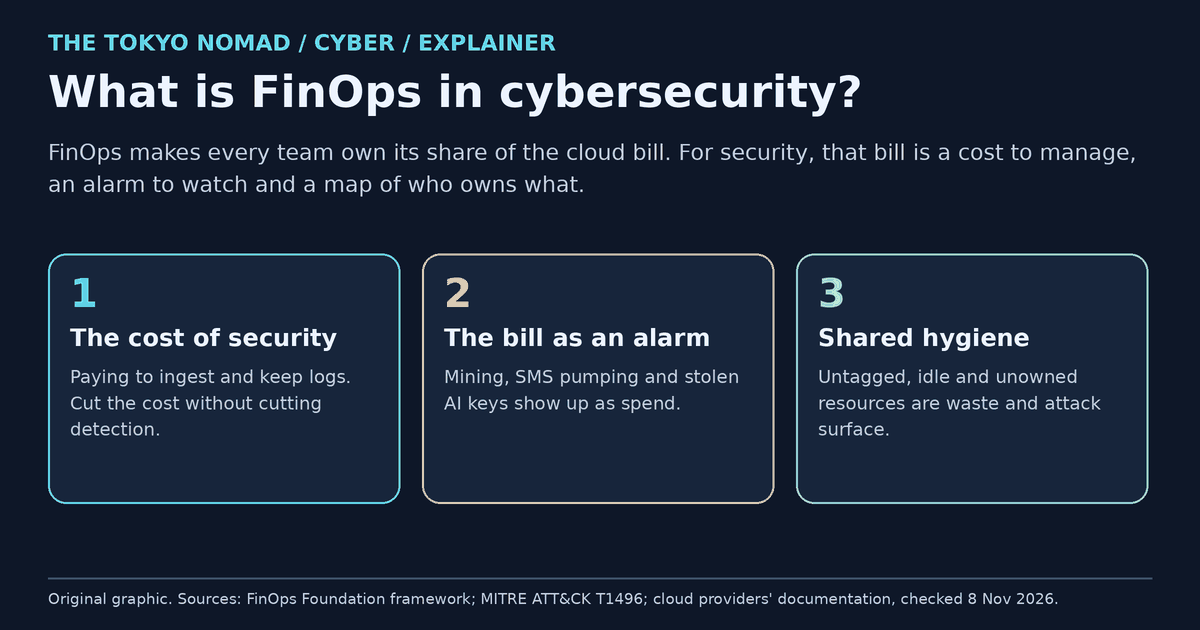
FinOps is the practice of making the teams that use the cloud responsible for what it costs. It sounds like a finance topic, but it meets security in three places. Security tools cost money, and much of that money pays to ingest and keep logs, so a careless saving can switch off a detection. The bill is also an alarm: attackers who steal cloud keys run cryptocurrency miners, send text messages or use AI models on your account, and the first sign may be the invoice. And both teams depend on the same hygiene: every resource has an owner, nothing is left idle, and nothing runs where nobody looks. This explainer covers what FinOps is, the three overlaps, how an attacker turns your bill into their income, and what to do about it.
FinOps in one minute
The FinOps Foundation, the non-profit at the Linux Foundation that maintains the FinOps Framework, defines it as "an operational framework and cultural practice which maximizes the business value of technology, enables timely data-driven decision making, and creates financial accountability through collaboration between engineering, finance, and business teams."
In practice, teams go round three phases again and again:
- Inform: see the cost, usage and efficiency data, and allocate each cost to a team.
- Optimize: find ways to get more value for the money.
- Operate: make those changes and keep them in place.
The aim is not simply to spend less. Microsoft's FinOps guidance puts it plainly: "The goal of FinOps isn't to save money, but to maximize revenue or business value through the cloud", while keeping "the level of performance, reliability, and security needed".
Security already has a seat at the table. The Foundation lists IT Security as an "allied persona" that works with FinOps "to optimize security spending, to improve IT Security financial governance, and to strengthen the organization's overall cloud security posture". Billing data is also becoming easier to share: FOCUS, the Foundation's open format for cost and usage data across cloud, SaaS, AI and data centres, reached version 1.4 in June 2026.
Where FinOps meets security
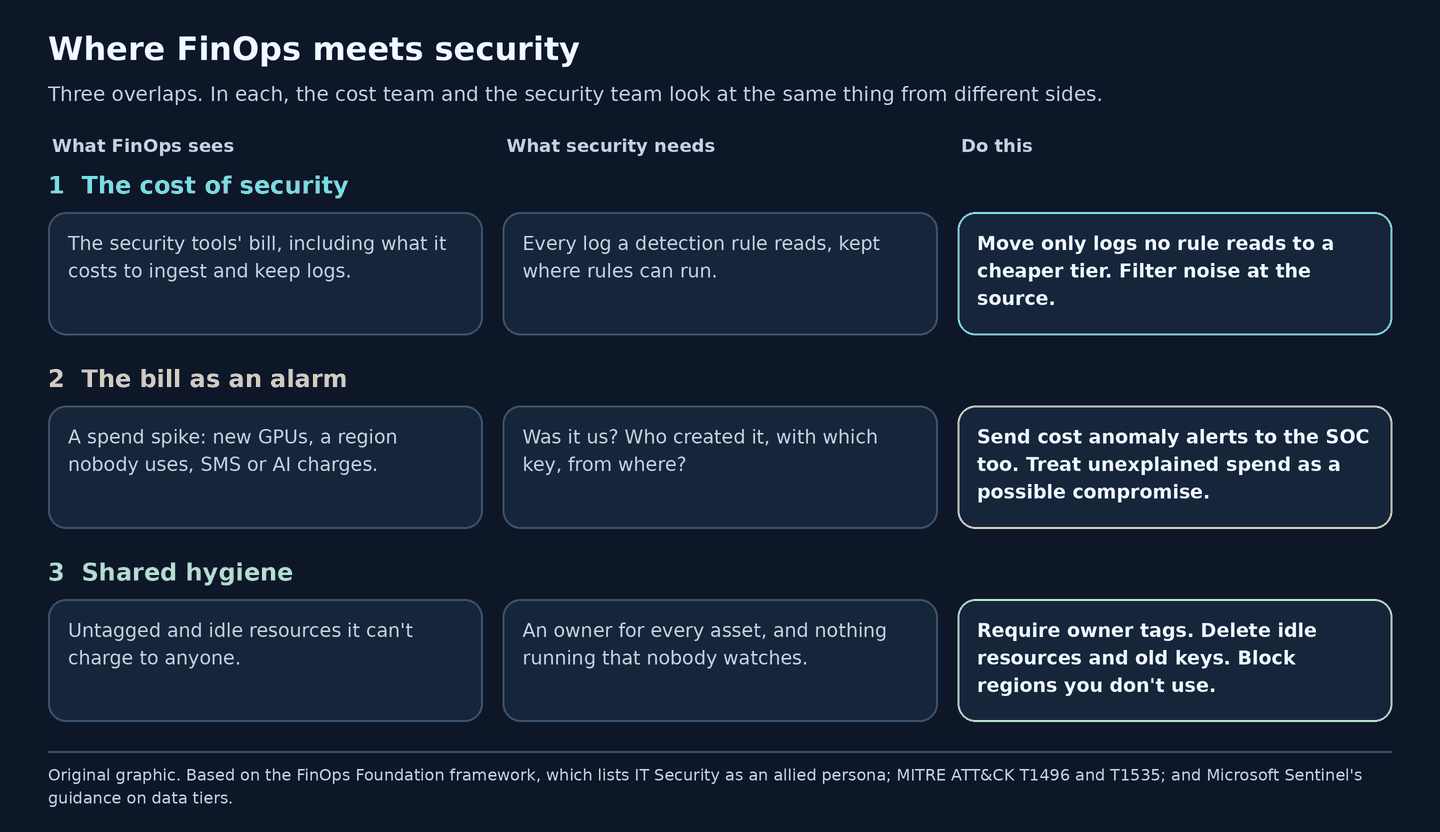
Figure 1. Original graphic. In each overlap, the cost team and the security team look at the same thing from different sides.
1. The cost of security: cut spend, not detection
Much of a cloud SIEM's bill pays to take logs in and keep them. Microsoft Sentinel, for example, charges for ingestion and for storage beyond the included period, and it shows the trade-off clearly with two storage tiers:
| Tier | What it is for | The catch |
|---|---|---|
| Analytics tier | Detection rules, alerting, hunting and investigation, at full speed | Standard ingestion cost |
| Data lake tier | Keeping large volumes for years at much lower cost, and searching them later | Microsoft: "If you ingest logs only into the data lake tier, those logs don't generate alerts." |
Microsoft's own guidance keeps EDR alerts, privileged-access logs, authentication events and threat-intelligence indicators in the analytics tier. It names high-volume "secondary" sources, such as cloud-storage access logs, NetFlow, TLS certificate, firewall, proxy and IoT logs, as candidates for the cheaper tier.
The rule that follows is simple: before moving a log to a cheaper tier or filtering it at the source, list the detection rules that read it. Removing a log your rules depend on has the same effect as an attacker switching logging off, which MITRE ATT&CK tracks as T1685.002 Disable or Modify Cloud Log. The difference is that nobody raises an alert, because the change was approved. Our log checklist for Sentinel and CrowdStrike shows how to check which sources your detections need.
A useful habit is to report security spend per log source, next to what that source lets you detect, rather than as one large total that invites a flat cut.
2. The bill as an alarm
Attackers who steal cloud credentials often spend your money directly. MITRE ATT&CK calls this T1496 Resource Hijacking: "Adversaries may leverage the resources of co-opted systems to complete resource-intensive tasks." It has four sub-techniques, and each one shows up somewhere on the bill:
| ATT&CK | What the attacker does | Where it shows on the bill |
|---|---|---|
| T1496.001 Compute Hijacking | Runs cryptocurrency miners on servers, containers or new cloud instances | Compute, often new or larger instances |
| T1496.002 Bandwidth Hijacking | Sells your bandwidth and IP addresses to proxy services, or uses them for scanning | Data transfer |
| T1496.003 SMS Pumping | Abuses one-time-password and sign-up forms to send masses of texts to numbers that earn the fraudster money | SMS and messaging |
| T1496.004 Cloud Service Hijacking | Sends spam and phishing through email and SMS services, or uses cloud AI models through stolen keys ("LLMjacking"), sometimes after switching on a service you never used | Email, messaging or AI model charges |
Location is a clue too. Attackers may build in a cloud region you never use, which ATT&CK lists as T1535 Unused/Unsupported Cloud Regions, because security teams often watch only their main regions. A cost report grouped by region sees every region. Real sending services abused for phishing are the subject of our analysis of Japan's mail-delivery platform breaches.
Every major cloud now offers built-in cost anomaly alerts, which are worth sending to the security team as well as to finance. Microsoft even documents how to bring them into Sentinel as incidents. But they are slow, by design, because they work from billing data. Google Cloud's early anomaly alerts arrive 20 to 40 minutes after the usage. AWS Cost Anomaly Detection can take up to 24 hours. Azure checks once a day, 36 hours after the UTC day ends, so 36 to 60 hours after the usage:
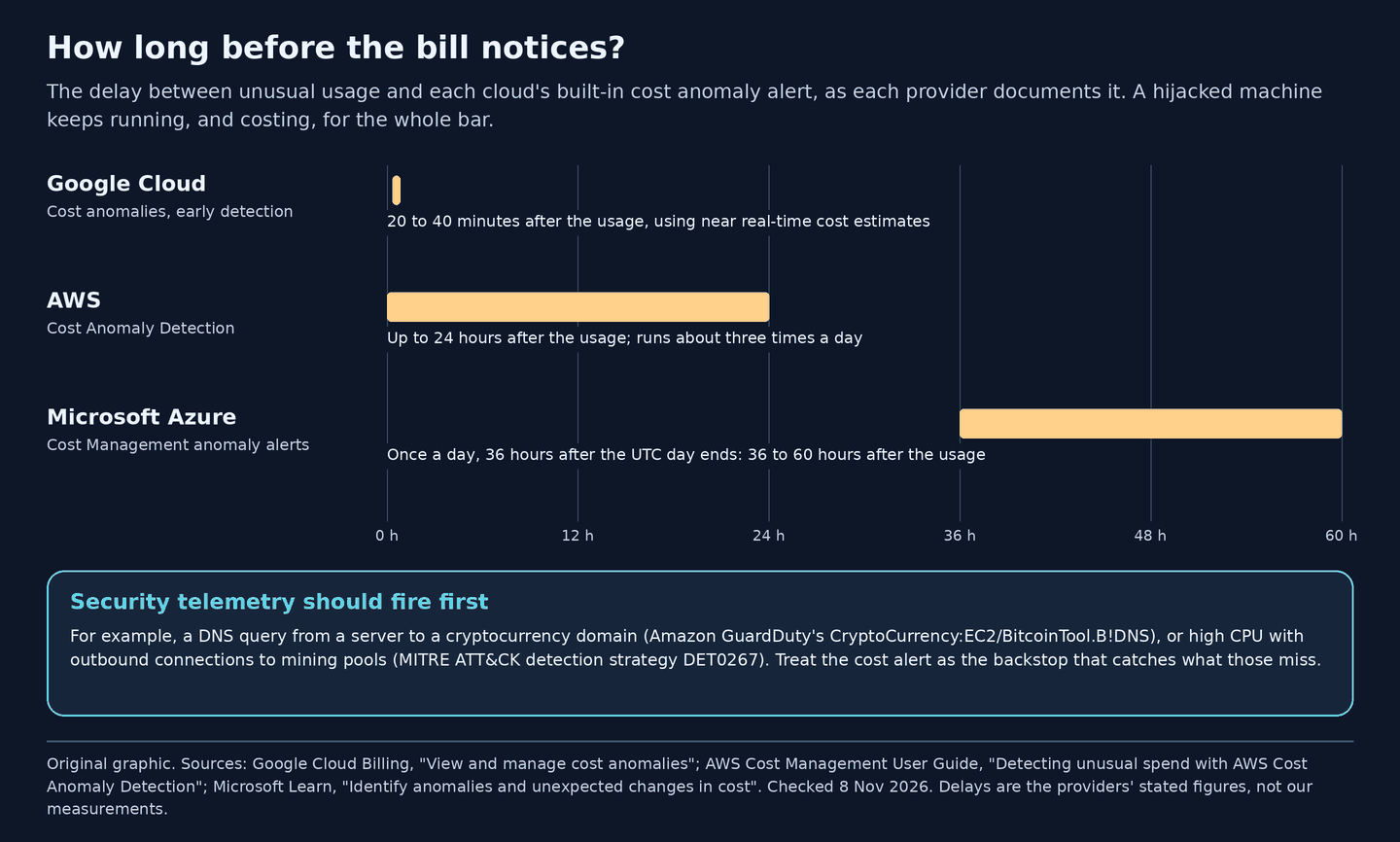
Figure 2. Original graphic. The delays are each provider's stated figures, checked on 8 November 2026, not our measurements.
There is a second gap. AWS notes that its detector needs 10 days of history for a newly used service before it can flag anomalies for that service, and switching on a service you never used is exactly what ATT&CK describes attackers doing with cloud AI. For services you do not use, a fixed budget threshold, or a policy that blocks them, works better than an anomaly model.
So the first alarm should come from security telemetry, such as GuardDuty's cryptocurrency finding or the high-CPU-plus-mining-pool analytics in ATT&CK's detection strategy DET0267. The cost alert is the backstop that catches what those miss.
3. Shared hygiene: owners, tags and idle resources
FinOps cannot allocate a cost without knowing who owns it, and security cannot defend an asset without knowing the same thing. One owner tag serves both. The Foundation's guidance on working with other disciplines includes "monitoring cloud security to identify potential risks by configuring and reporting appropriate policies and setting alerts", naming cyber asset attack surface management (CAASM) as an example.
The same clean-up helps both sides:
- Idle resources: a forgotten virtual machine or test environment costs money and is unpatched, unwatched attack surface.
- Old access keys: they cost nothing but remain a way in.
- Unused regions: blocking them removes surprise costs and the hiding place behind T1535.
When something does go wrong, billing data answers what was used, where and how much, quickly and in money. The cloud's activity logs answer who did it.
The attacker's view
How a cost-abuse intrusion usually unfolds, step by step:
- Get a key. Steal a cloud access key or API token from code, a CI system, a laptop or a phishing page (T1078.004 Cloud Accounts).
- Pick quiet ground. Choose a region nobody watches (T1535), or switch on a service the victim has never used, so neither the SOC nor the anomaly model has a baseline.
- Turn the account into income (T1496):
- mine on large instances;
- resell bandwidth;
- pump SMS through a sign-up form;
- sell access to AI models through a reverse proxy.
- Count on the delays. The bill arrives days later, and the cost alert hours or days later. If a cost-saving exercise has already moved the control-plane logs out of reach of the detection rules, nothing alerts at all.
The defender's view: what to do this month
- Turn on cost anomaly alerts everywhere, in every AWS account, Azure subscription and Google Cloud billing account. Send them to the security queue as well as to finance.
- Set hard budgets on sandboxes and on services you do not use. In Azure, a budget can notify an action group that takes automated action to reduce or stop further charges.
- Block what you do not use: deny unused regions and services with your cloud's policy controls. Put spending limits on SMS and AI API keys, and rotate those keys.
- Protect detection when cutting cost. Before any log saving, list the rules that read each source. Keep EDR, identity, privileged-access and cloud control-plane logs where rules run.
- Make ownership mandatory. Require an owner tag, review untagged spend each week as an unknown asset, and delete idle resources and old keys in the same pass.
Who does what
| Team | Owns | Needs from the others |
|---|---|---|
| FinOps | Cost data, allocation, budgets and anomaly alerts | From security: the list of log sources that must not be cut, and how to reach the on-call analyst |
| Security (SOC, SIEM) | Detections, log coverage, and the triage of unexplained spend | From FinOps: anomaly alerts, and cost by account, region and service |
| Engineering and IT Operations | Owner tags, clean-up, region and service policies | From both: one tagging standard and one list of allowed regions |
| Finance | Budgets and forecasts | From security: spend explained per log source and capability, not one total |
What cost data cannot tell you
- It is late. The anomaly alerts in Figure 2 arrive minutes to days after the usage.
- It shows what and where, not who. The activity logs answer who.
- It needs history. Azure's model learns from 60 days of usage, and AWS needs 10 days for a new service.
- Slow abuse can hide. A small, steady miner or a trickle of SMS can stay inside the normal range.
- Fixed prices don't spike. Services bought at a flat price or a commitment may not change the bill at all when abused.
Sources and updates
- FinOps Foundation: What is FinOps?
- FinOps Foundation: FinOps Phases
- FinOps Foundation: FinOps Personas, including Security as an allied persona
- FinOps Foundation: Intersecting Disciplines capability
- FinOps Foundation: FinOps Framework 2026, 19 March 2026
- FOCUS: What is FOCUS? (version 1.4, ratified 4 June 2026)
- Microsoft Learn: What is FinOps? · FinOps Framework lifecycle
- MITRE ATT&CK: T1496 Resource Hijacking, with sub-techniques .001, .002, .003 and .004
- MITRE ATT&CK: T1535 Unused/Unsupported Cloud Regions · T1685.002 Disable or Modify Cloud Log · T1078.004 Cloud Accounts · DET0267 Resource Hijacking Detection Strategy
- Google Cloud Billing: View and manage cost anomalies
- AWS: Detecting unusual spend with AWS Cost Anomaly Detection
- AWS: GuardDuty EC2 finding types (CryptoCurrency:EC2/BitcoinTool.B!DNS)
- Microsoft Learn: Identify anomalies and unexpected changes in cost · What is Microsoft Cost Management (budget and anomaly alerts)
- Microsoft Learn: Manage data tiers and retention in Microsoft Sentinel · Data lake ingestion guidance · Log retention tiers
8 November 2026: first published. The FinOps Foundation's principles page loads its text with a script and showed only its menus to our fetcher, so we do not list the principles; its definition, phases, personas and intersecting-disciplines pages loaded directly, and Microsoft's FinOps documentation, which follows the Foundation's framework, gives the same definition and phases. ATT&CK's former T1562.008 page now redirects to T1685.002, which we cite. The delays in Figure 2 are the providers' stated figures, not our measurements. We quote no prices, because they change often.